Deploy and Host Samarium on Sealos
Samarium is an open-source Laravel ERP and CMS for small business operations. This template deploys Samarium with Apache/PHP, persistent Laravel storage, and a managed MySQL database on Sealos Cloud.
About Hosting Samarium
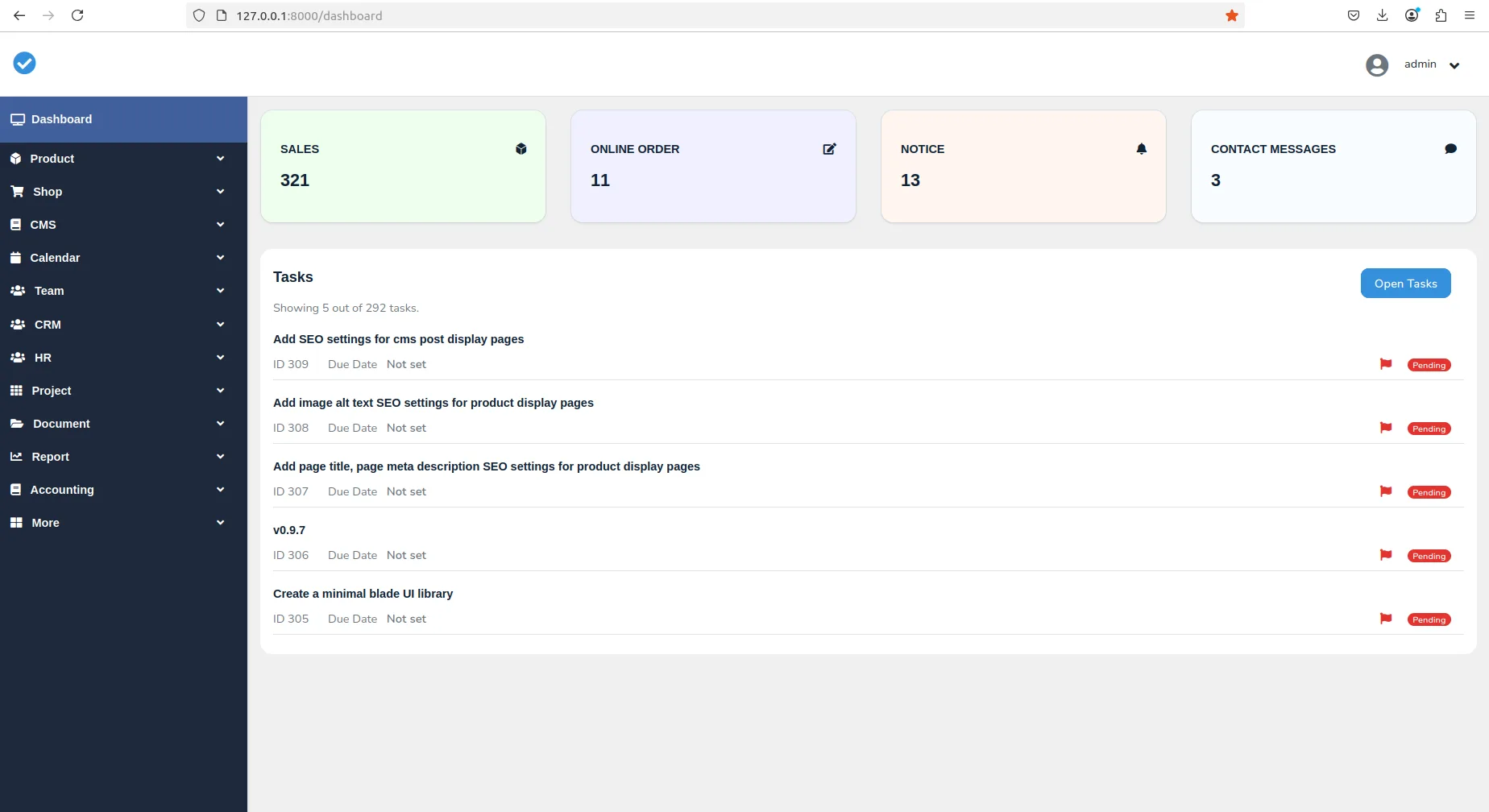
Samarium combines ERP workflows and CMS pages in one Laravel application. It provides dashboard modules for sales, purchases, inventory, accounting, customers, vendors, tasks, calendar entries, notices, galleries, and public website pages.
This Sealos template provisions the web application, a KubeBlocks MySQL database, persistent Laravel storage, HTTPS ingress, and startup probes. During first deployment, the bootstrap container runs database migrations, prepares Laravel storage/cache directories, creates the initial administrator, and seeds the minimal CMS records needed for a usable first page and dashboard.
Common Use Cases
- Small-business ERP: Manage products, stock, sales, purchases, invoices, and basic accounting in one place.
- Customer and vendor operations: Keep customer, vendor, payment, and transaction records together.
- Point-of-sale workflows: Use Samarium as a lightweight checkout and receipt system for small teams.
- CMS website management: Publish basic pages, navigation, notices, gallery items, and contact information.
- Operations dashboard: Track business activity from a browser without maintaining PHP, MySQL, or Kubernetes manually.
Dependencies for Samarium Hosting
The Sealos template includes all required runtime resources for Samarium hosting:
- Application runtime: Apache with PHP 8.2, packaged as
ghcr.io/yangchuansheng/samarium:0.0.0-9514fcadb867
- Database: KubeBlocks MySQL 8.0-compatible single-node cluster
- Persistent storage: Laravel
storage and bootstrap/cache volumes
- Network access: Sealos HTTPS ingress with an automatically generated public URL
Deployment Dependencies
Implementation Details
Architecture Components:
This template deploys the following services:
- Samarium Web Application: A single StatefulSet running Apache/PHP on port 80.
- Bootstrap Init Container: Runs Laravel migrations, creates the initial administrator, prepares storage, and clears unsafe route cache state before the main container starts.
- MySQL Database: A KubeBlocks
apecloud-mysql cluster storing Samarium business data.
- Persistent Volumes: Separate volumes for
/var/www/html/storage and /var/www/html/bootstrap/cache.
- Ingress and App Entry: A Sealos-managed HTTPS endpoint and application card.
Configuration:
- The database name is
samarium and connection credentials are injected from the KubeBlocks connection secret.
- The app runs with
APP_ENV=production, APP_DEBUG=false, file cache, file sessions, and synchronous queues.
- The initial administrator is created from the deployment inputs
ADMIN_NAME, ADMIN_EMAIL, and ADMIN_PASSWORD.
- Live resource tuning verified the web container at
100m CPU and 128Mi memory. The bootstrap init container keeps 200m CPU and 256Mi memory for migrations and first-run setup. MySQL uses 500m CPU and 512Mi memory.
Login and registration behavior:
Use the configured administrator email and password to log in at /login. The /register page is available for additional standard users, but self-registered accounts may go through Samarium's email verification or profile flow and are not the initial dashboard administrator. Use the configured administrator account for dashboard setup and management.
Why Deploy Samarium on Sealos?
Sealos is an AI-assisted Cloud Operating System built on Kubernetes that unifies the application lifecycle from deployment to operations. By deploying Samarium on Sealos, you get:
- One-click deployment: Start from the template page and avoid manual PHP, Apache, MySQL, and Kubernetes setup.
- Managed public access: Each deployment receives an HTTPS URL with automatic certificate handling.
- Persistent data: Database and Laravel storage volumes survive restarts and upgrades.
- Easy customization: Adjust environment variables, resource limits, storage, and networking from Canvas resource cards or the AI dialog.
- Resource efficiency: Pay-as-you-go Kubernetes resources with a template tuned through live deployment tests.
- Operational visibility: Inspect pods, logs, services, ingress, and database resources from the Sealos workspace.
Deploy Samarium on Sealos and focus on business workflows instead of infrastructure maintenance.
Deployment Guide
- Open the Samarium template and click Deploy Now.
- Configure the parameters in the popup dialog:
ADMIN_NAME: Display name for the initial administrator.ADMIN_EMAIL: Email address used to log in.ADMIN_PASSWORD: Initial administrator password. Use at least 8 characters and save it before deployment.
- Wait for deployment to complete, typically 2-3 minutes. After deployment, you will be redirected to Canvas. For later changes, describe your request in the AI dialog or click the relevant resource cards to modify settings.
- Open the public application URL generated by Sealos.
- Log in at
/login with the configured administrator email and password.
- Optional: open
/register to create additional standard user accounts. Use the administrator account for dashboard management.
Configuration
After deployment, you can configure Samarium through:
- Samarium Dashboard: Log in as the administrator and manage ERP, CMS, company, product, sales, purchase, and accounting data.
- AI Dialog: Describe post-deployment changes in Canvas and let Sealos help apply updates.
- Resource Cards: Click the application, StatefulSet, ingress, storage, or MySQL resource cards to adjust settings.
- Admin Inputs: Re-deploy with a different
ADMIN_EMAIL or ADMIN_PASSWORD if you need a different first administrator.
Scaling
Samarium stores Laravel sessions, uploads, and cache data on persistent volumes. Keep one application replica unless you also configure shared sessions and shared file storage for multi-replica operation.
To adjust resources:
- Open the Canvas for your deployment.
- Click the Samarium StatefulSet resource card.
- Adjust CPU, memory, or storage according to your workload.
- Apply the changes from the dialog or resource editor.
Troubleshooting
Cannot access the dashboard after registration
- Cause: Self-registered users are not the initial administrator and may need email verification or additional profile setup.
- Solution: Log in at
/login with the ADMIN_EMAIL and ADMIN_PASSWORD configured during deployment.
First start takes longer than expected
- Cause: The bootstrap container runs Laravel migrations, creates initial data, prepares storage permissions, and warms selected Laravel caches.
- Solution: Wait for the application pod to become ready in Canvas, then open the application URL again.
Public pages work but dashboard login fails
- Cause: The administrator email or password may have been entered incorrectly during deployment.
- Solution: Re-deploy with a known
ADMIN_EMAIL and ADMIN_PASSWORD, or update the user record from the database if you manage the database directly.
Getting Help
Additional Resources
License
This Sealos template is provided under the repository license for the templates project. Samarium itself is licensed under the MIT License.