Running Eaglercraft requires coordinating two network layers: the browser transport and the Minecraft server protocol. Players connect either by visiting a Browser Play Link in standard web browsers or by entering a WebSocket Server Address into an existing compatible client. The Eaglercraft Gateway terminates those incoming WebSocket streams and proxies them to the internal Game Server, which processes the world state and persists chunks to a Persistent World. Operators monitor readiness, active players, and system resources through a separate Server Management Panel.
This guide breaks down how each process communicates and maps the architecture across four hosting models: the Sealos template, a Self-Hosted Eaglercraft Deployment on an Ubuntu VPS, Docker Compose, and a client-hosted Shared World.
The Architecture in One View
The path from a player's browser to the stored world looks like this:
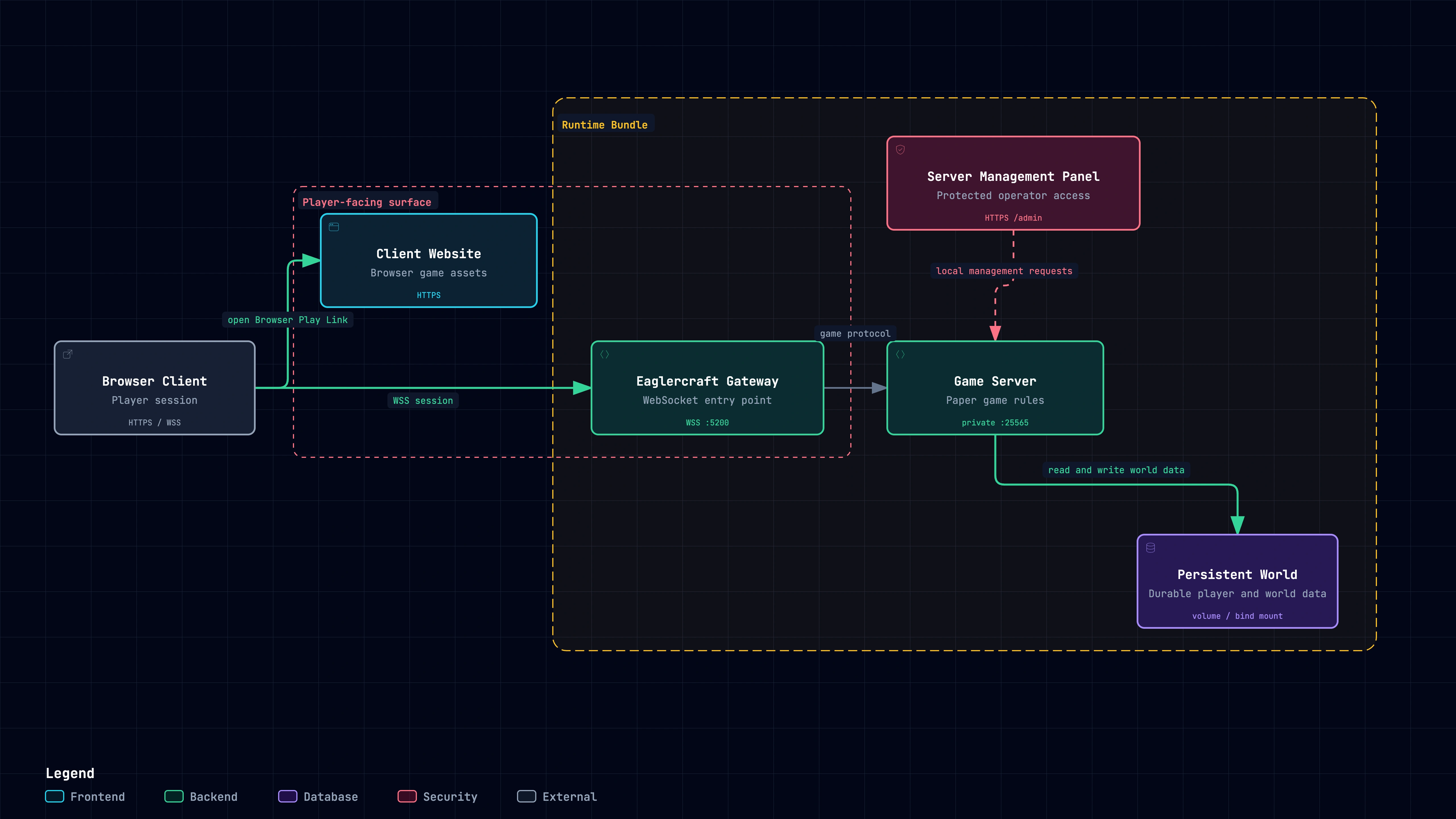 Eaglercraft architecture showing the Browser Client loading the Client Website over HTTPS, opening a WSS session through the Eaglercraft Gateway, reaching the Game Server, and saving to the Persistent World, with the Server Management Panel sending protected operator requests.
Players load the Client Website over HTTPS or connect from an existing compatible client over WSS. The Eaglercraft Gateway accepts the session and forwards it to the Game Server, which reads and writes the Persistent World. Operators manage server state through the protected Server Management Panel.
The browser experience splits into delivery and transport. The Client Website hosts the static HTML, JavaScript, and asset bundles needed to execute the game in the browser. The Eaglercraft Gateway handles the runtime WebSocket upgrade, translating browser TCP connections into Minecraft protocol packets. Players can load the bundled web client directly or point an existing offline HTML5 client straight to the Gateway.
What Each Component Does
| Component | Job | Typical operator or player action |
|---|---|---|
| Browser Client | Runs the game interface and accepts keyboard, mouse, and sound input. | Open the Browser Play Link and select Multiplayer. |
| Client Website | Serves the browser client page and its static assets. | Share its HTTPS URL with players. |
| Eaglercraft Gateway | Terminates Eaglercraft WebSocket connections and forwards player sessions. | Publish it through HTTPS and WSS. |
| Game Server | Applies game rules, tracks players, and owns the multiplayer world. | Wait for Paper readiness and save the world. |
| Persistent World | Stores world, player, plugin, and server data on durable storage. | Keep the volume or bind mount during restarts and recovery. |
| Server Management Panel | Exposes readiness, player, world, plugin, and command controls. | Open the protected panel using your deployment guide. |
Players only interact with the client layer, whereas server owners manage the Gateway, the Paper Game Server, and the backing storage. The Sealos template packages these components into a single Runtime Bundle, exposing a unified deployment while maintaining isolated internal services.
HTTPS, WSS, and the Three Addresses
The Sealos template publishes three primary endpoints on its public domain. Self-hosted deployments handle panel routing separately.
| Address | Protocol and example | Enter it or open it here |
|---|---|---|
| Browser Play Link | HTTPS, https://play.example.com/ | Browser address bar. |
| WebSocket Server Address | WSS, wss://play.example.com/ | Multiplayer server field in an existing compatible client. |
| Server Management Panel | HTTPS, https://play.example.com/admin | Operator browser after the application is ready. |
HTTPS serves static assets and the admin console. WSS provides the TLS-encrypted WebSocket transport required by Eaglercraft network traffic. A web browser expects the Browser Play Link in its URL bar, while a standalone client requires the WebSocket Server Address in its Multiplayer server list. The /admin route gives administrative access to the container and requires separate credentials and firewall safeguards.
Public game traffic reaches the Eaglercraft Gateway on port 5200, which proxies back to Paper listening on loopback port 25565. The management panel runs independently on port 5201, with Sealos routing public /admin paths to it. Self-hosted VPS deployments bind the panel to 0.0.0.0:5201, requiring firewall rules to block external traffic in favor of an SSH tunnel to http://127.0.0.1:5201/admin. Docker Compose binds 5201 directly to host 127.0.0.1. The reverse proxy example below publishes the Gateway port exclusively.
Choose a Hosting Path
| Path | Best fit | What you operate |
|---|---|---|
| Sealos template | You want the Runtime Bundle and a managed application surface. | Resource allocation, credentials, Persistent World, and recovery copies. |
| Self-Hosted Eaglercraft Deployment on an Ubuntu VPS | You administer the host and want direct control of services and Caddy. | Runtime files, systemd services, firewall, TLS entry point, panel access, and backups. |
| Docker Compose | You already operate a Docker host and prefer a reproducible data directory. | Compose files, image updates, bind-mounted data, Caddy, and backup and restore checks. |
| Shared World | You need a temporary session from a compatible client's sharing feature. | The host browser session and that client's sharing setup. |
The client-side Shared World keeps game state bound to the host browser tab, tearing down when closed. A dedicated Game Server maintains world persistence independent of connected players. VPS and Docker Compose instances give you full control over systemd units, configuration files, and reverse proxy rules. The Sealos template automates container lifecycle and networking while retaining the same underlying architecture.
For pricing structures and resource sizing, refer to Eaglercraft Hosting Costs: Free Options, Paid Plans, and Setup Trade-offs. Check your cloud dashboard and Cost Center for real-time rates, compute tiers, and usage breakdowns.
How the Sealos Template Maps to the Stack
The Sealos template definition provisions the stack based on your target game version and Administrator Password. Each deployment spins up a dedicated Paper instance. The catalog assigns a default allocation of 0.2 vCPU, 1 GiB memory, and a 1 GiB persistent volume; increase these thresholds based on player concurrency, render distances, and plugin overhead.
Once provisioned, navigate to the application URL and log in at /admin. The Server Management Panel often starts before the Java process finishes initialization, so check for the Paper is ready status flag before attempting connections. Click Join game to access the Client Website. Each player sets a username in the client, selects the default server entry, and registers an in-game password using server chat commands. The Administrator Password secures the web management interface; each Player Account manages its own game credentials.
Benchmark runs from the first-join workflow documentation verified release 2.2.7 with Eaglercraft 1.8 and Paper 1.8.8. Two separate browser sessions connected simultaneously over public HTTPS/WSS, and world changes persisted across container restarts. Multi-region latency, 1.12 protocol variations, and higher concurrent player counts require independent capacity planning.

Open the Eaglercraft template on Sealos to deploy the preconfigured stack directly.
Use Your Own Domain
Configuring a custom domain gives players a permanent entry point like play.example.com. The setup requires three steps:
- Add an A or CNAME DNS record pointing your domain to the server IP.
- Configure a reverse proxy like Caddy to terminate TLS and issue certificates.
- Proxy HTTPS requests and WebSocket upgrades to the Eaglercraft Gateway while keeping the Paper port private.
A minimal production Caddyfile on an Ubuntu VPS with ports 80 and 443 open looks like this:
Caddy handles WebSocket upgrades without extra directives. Setting header_up X-Real-IP {remote_host} passes the player IP through to the Eaglercraft Gateway for accurate logging and rate limiting. In Docker Compose setups, point upstream to eaglercraft:5200 within the bridge network. Keep panel port 5201 isolated behind localhost or SSH tunnels. If using custom subdomains for the panel, set PUBLIC_GAME_URL=https://play.example.com/ in the environment so internal UI links resolve to the correct client address.
After changing DNS records, verify certificate issuance and external WSS handshakes before inviting players. Follow the How to Host an Eaglercraft Server on an Ubuntu VPS tutorial for complete systemd, firewall, and backup instructions. For containerised environments, see Run Eaglercraft with Docker Compose for compose configurations and volume mount permissions.
Direct Paper and Proxy-Based Integration
The prepackaged container runtime shared by Sealos, VPS, and Docker deployments runs an EaglercraftXBungee gateway on Waterfall in front of a Paper Game Server. Even in single-server deployments, this proxy layer handles WebSocket termination.
If you are retrofitting Eaglercraft support onto an existing Minecraft network, the upstream EaglerXServer guide supports two architectures:
| Decision | Direct Paper integration | Proxy-based integration |
|---|---|---|
| Gateway placement | Install the compatible EaglerXServer plugin in the Paper Game Server. | Install the Gateway plugin in BungeeCord or Velocity ahead of Game Servers. |
| Version compatibility | Check the plugin's supported Paper and Java versions; newer Paper versions have maintenance limits. | Check the proxy, Java runtime, and every target Game Server protocol. |
| Client protocol | Select matching clients and any required ViaVersion, ViaBackwards, or ViaRewind translation. | Plan translation across the proxy and each Game Server hop. |
| Player identity | Preserve the Game Server's authentication policy and test returning player UUIDs. | Align proxy forwarding, Game Server trust settings, and authentication; test names, UUIDs, and saved inventory. |
Direct plugin integration works well for isolated, standalone Paper servers. Proxy architectures fit multi-server BungeeCord or Velocity networks requiring cross-server routing or shared player authentication. Always take a full backup of player dat files before altering UUID forwarding or authentication modes, and test player reconnections in a staging environment.
Common Address Mistakes
| Symptom | Correct check |
|---|---|
| The browser says the server address is invalid. | Open the HTTPS Browser Play Link in the address bar. |
| Add Server rejects the value. | Paste the wss:// WebSocket Server Address into a compatible client's Multiplayer field. |
| The panel opens while joining fails. | Wait for Paper readiness and inspect the application logs or Game Server status. |
| A friend reaches a different world. | Compare the hostname and server entry, then confirm both clients use the intended Game Server. |
| A restart loses progress. | Confirm the original Persistent World volume or bind mount stayed attached and complete a recovery check separately. |
| The page opens but the game disconnects. | Check client compatibility, WSS, Paper readiness, and join or login symptoms. |
| The public page does not open. | Follow the troubleshooting guide after checking the application status and public URL. |
Verifying the protocol prefix resolves most connection issues: HTTPS opens web pages, WSS establishes real-time game sockets, and /admin leads to the administrative interface. Administrative and in-game credentials operate independently: the Administrator Password guards web controls, while Player Account passwords secure individual player profiles.
Where to Continue
To deploy on Sealos and invite players right away, follow the first-join Eaglercraft tutorial. For a bare-metal or cloud instance, see the Ubuntu VPS guide. For local or orchestrated containers, refer to the Docker Compose guide. If you encounter connection or registration failures, consult the public URL troubleshooting guide and the Eaglercraft join troubleshooting section.
Regardless of deployment model, maintain the separation of concerns across your stack: expose the Client Website over HTTPS, route game traffic through the Eaglercraft Gateway over WSS, isolate the internal Game Server, lock down the Server Management Panel, and mount reliable storage for the Persistent World.