sealos.io
AFFiNE
Build production-ready tools templates with Sealos.

https://affine.pro/deploy now
AFFiNE
Tools
A privacy-focused, local-first, open-source workspace for notes, docs, whiteboards, and team knowledge management.

Translate scientific PDFs with PDFMathTranslate on Sealos while preserving formulas and layout. Use a password-protected WebUI with persistent files and caches.
Launch in your Sealos workspace.
Start with the resources defined by the PDFMathTranslate template. Review CPU, memory, persistent storage, and network allocations for every service in Canvas. Capacity needs depend on your data and workload; monitor usage as they grow.
Template configuration and setupUse the application URL or connection details shown in Canvas. Follow the deployment guide for first-time account setup or client configuration, and keep generated credentials available for that step.
Sealos monthly plans include compute, memory, storage, and traffic. Size your plan for all deployed services. Software licenses and external AI or API services may have separate terms and charges. Confirm the applicable plan and optional charges in Cost Center.
Compare Sealos resource plansFor current cloud charges, refer to Sealos plan pricing. Upstream documentation may reference earlier billing models.
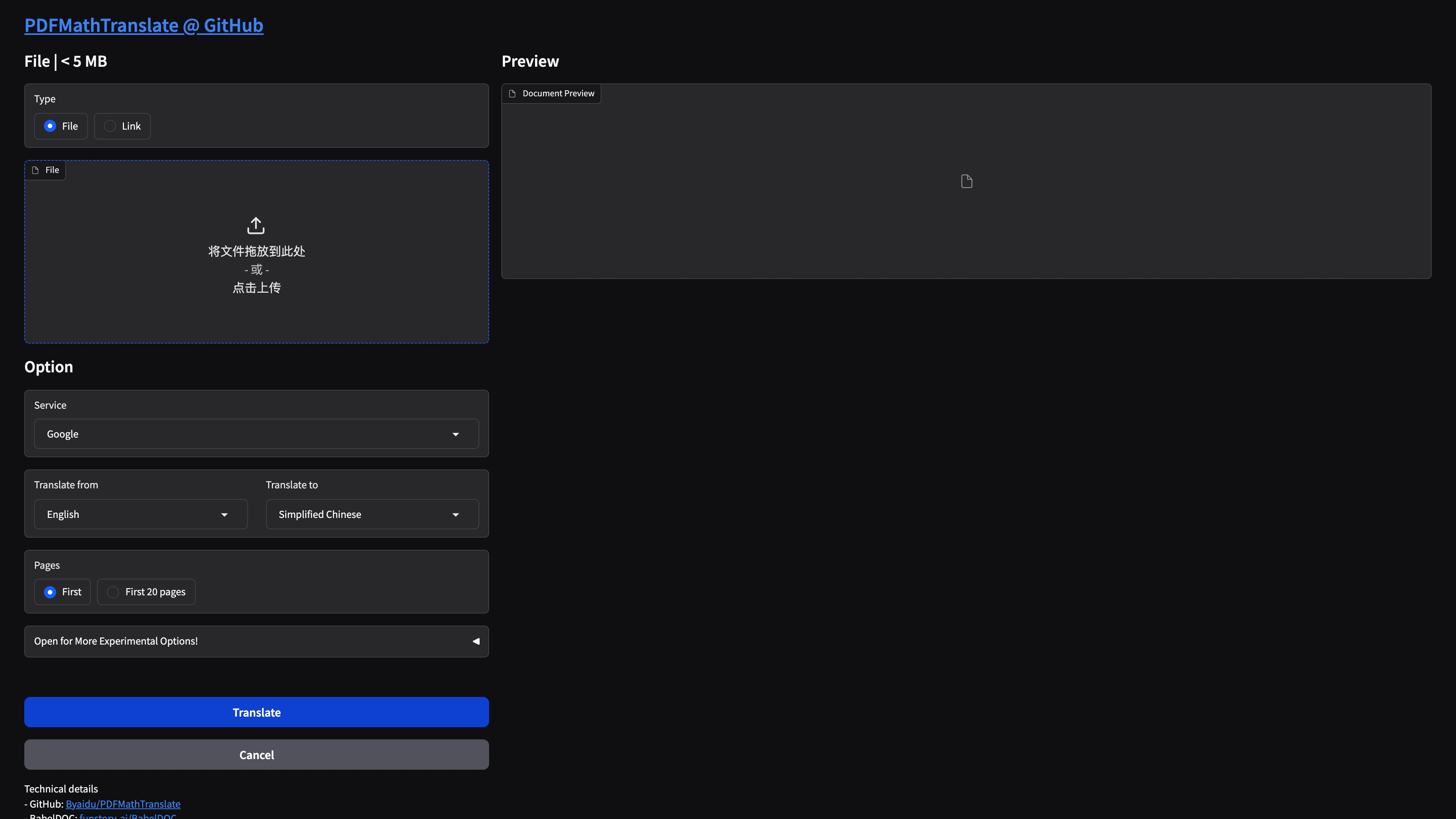
PDFMathTranslate translates PDF documents while preserving formulas, tables, and page layout. This template runs the upstream WebUI on Sealos with persistent configuration, model caches, and generated files.
The template deploys:
1.9.11 from an immutable multi-architecture image digest78601Gi persistent volume mounted at /data1000The WebUI requires the username and password supplied during deployment. PDFMathTranslate has no registration flow, so share these credentials only with people who should access uploaded documents and saved translation-provider settings. The upstream runtime is a single service and has no database or object-storage dependency.
Google and Bing work from the WebUI without user-supplied API keys. Provider availability and rate limits remain subject to their public endpoints.
| Component | Configuration |
|---|---|
| Image | byaidu/pdf2zh:1.9.11 pinned to sha256:8e083e... |
| Workload | Single-replica StatefulSet |
| Public port | 7860 |
| Persistent mount | /data |
| Runtime home | /data/home |
| Upstream config path | ~/.config/PDFMathTranslate/config.json |
| Deployed config path | /data/home/.config/PDFMathTranslate/config.json |
| Output directory | /data/pdf2zh_files |
| Access control | Gradio credential login from a runtime-only mode-0600 file |
| Health checks | HTTP GET / |
The template injects the required deployment credentials as container environment values. A small ConfigMap startup script applies umask 077, writes /tmp/pdf2zh-auth.csv, and executes pdf2zh -i --authorized /tmp/pdf2zh-auth.csv. The resulting mode-0600 authentication file stays outside the persistent volume and disappears with the container. Setting the working directory to /data keeps generated PDFs on the persistent volume, while HOME=/data/home keeps configuration, fonts, models, and translation caches across restarts.
Both WebUI credential fields are required. Keep them in a password manager because PDFMathTranslate does not provide registration or password recovery. Upstream parses the credential file as comma-separated values, so use a username and password without commas or line breaks.
Every user shares the same deployment-level credentials. Changing either value requires updating the StatefulSet environment through a new deployment or template update.
The Experimental Options panel controls thread count, translation-cache bypass, font subsetting, custom formula-font matching, and BabelDOC mode.
The service selector reveals the fields required by the chosen provider. Common examples include:
| Service | Typical fields |
|---|---|
| Google or Bing | No user-supplied key |
| DeepL | DEEPL_AUTH_KEY |
| OpenAI | OPENAI_BASE_URL, OPENAI_API_KEY, OPENAI_MODEL |
| Gemini | GEMINI_API_KEY, GEMINI_MODEL |
| DeepSeek | DEEPSEEK_API_KEY, DEEPSEEK_MODEL |
| OpenAI-liked | Compatible base URL, API key, and model |
| Ollama | Reachable OLLAMA_HOST and model name |
PDFMathTranslate stores provider settings in /data/home/.config/PDFMathTranslate/config.json. The WebUI credentials protect this persistent configuration, uploaded documents, and the ability to spend paid-provider quota. Use a strong, unique password, limit credential sharing to trusted users, and use provider keys with the narrowest practical scope.
| Path | Purpose |
|---|---|
/data/home/.config/PDFMathTranslate | Language defaults and translation-service settings |
/data/home/.cache | Layout models, fonts, and translation caches |
/data/pdf2zh_files | Uploaded source PDFs and generated Mono/Dual PDFs |
All three locations share the template's 1Gi ReadWriteOnce persistent volume. Monitor storage use when processing many or large documents.
| CPU limit | Memory limit | CPU request | Memory request |
|---|---|---|---|
100m | 2048Mi | 10m | 204Mi |
Live cold-start and uncached translation tests established these defaults. A 512Mi container was OOM-killed while loading the ONNX model, and 1024Mi reached 92.93% of its cgroup limit. The 2048Mi tier provides operating headroom. The lowest CPU tier completed the official one-page uncached sample in 77.69 seconds.
Increase CPU to 200m or 500m for faster translations, concurrent users, larger PDFs, or BabelDOC workloads.
The template uses one replica because configuration, caches, and generated files share a ReadWriteOnce volume. Vertical CPU scaling is the direct path for improving throughput. Multi-replica operation requires a shared storage design and upstream-aware job coordination.
Check the Pod logs in Sealos. A first start can download the DocLayout ONNX model and fonts before Gradio begins listening on port 7860.
Try Google or Bing to verify the PDF pipeline without a user-supplied key. For another provider, reopen its service fields and confirm the endpoint, key, and model.
Use the exact username and password entered during deployment. PDFMathTranslate has no registration or password-recovery flow; update the StatefulSet environment through a new deployment or template update when credentials need to change.
Increase the CPU limit in Sealos. PDF layout analysis is CPU-bound, and the default 100m tier favors a small resource footprint.
The public Ingress accepts request bodies up to 32m. Reduce the PDF size or raise nginx.ingress.kubernetes.io/proxy-body-size in the Ingress for larger documents.
Remove old files from /data/pdf2zh_files and monitor the 1Gi persistent volume. Models and fonts under /data/home/.cache also use this volume.
PDFMathTranslate is distributed under the GNU Affero General Public License v3.0. This repository provides the Sealos deployment template and does not change the upstream license.
A shorter path from an app you want to an app you can run. Sealos brings deployment and ongoing operations into one place.
Start with a ready-made template. Review its configuration and launch from the Sealos console.
Run on managed infrastructure with built-in workload scheduling and recovery.
Give your application a public HTTPS endpoint with certificates managed for you.
Keep application data on persistent volumes across container restarts.
Adjust CPU, memory, and replicas from the console as your workload changes.
Sealos provisions the resources defined by your template and brings them together in your workspace.
Container workloads with configurable CPU, memory, and replicas.
An address for your app, with managed TLS certificates.
A database provisioned alongside your app when the template calls for one.
Storage for the files and data your application needs to keep.
Application settings and secrets configured in one place.
Inspect container logs and resource usage from the console.
Resources and their configuration vary by template. Review the deployment form for this app’s exact setup.
Explore more production-ready templates.
Build production-ready tools templates with Sealos.
A privacy-focused, local-first, open-source workspace for notes, docs, whiteboards, and team knowledge management.
Build production-ready tools templates with Sealos.

Google Chrome browser running in a LinuxServer.io Selkies container with a web-based desktop UI.
Build production-ready tools templates with Sealos.
Deploy the self-hosted DeeplX translation API on Sealos and connect applications to its HTTP endpoint. This independent gateway integrates with DeepL translation.