Deploy and Host DeepSeek Harness on Sealos
DeepSeek Harness is an open-source coding-agent workspace with a browser interface for chat, tools, sessions, and model configuration. This template deploys DeepSeek Harness 0.2.2-rc.5 as a single StatefulSet with persistent storage on Sealos Cloud.
About Hosting DeepSeek Harness
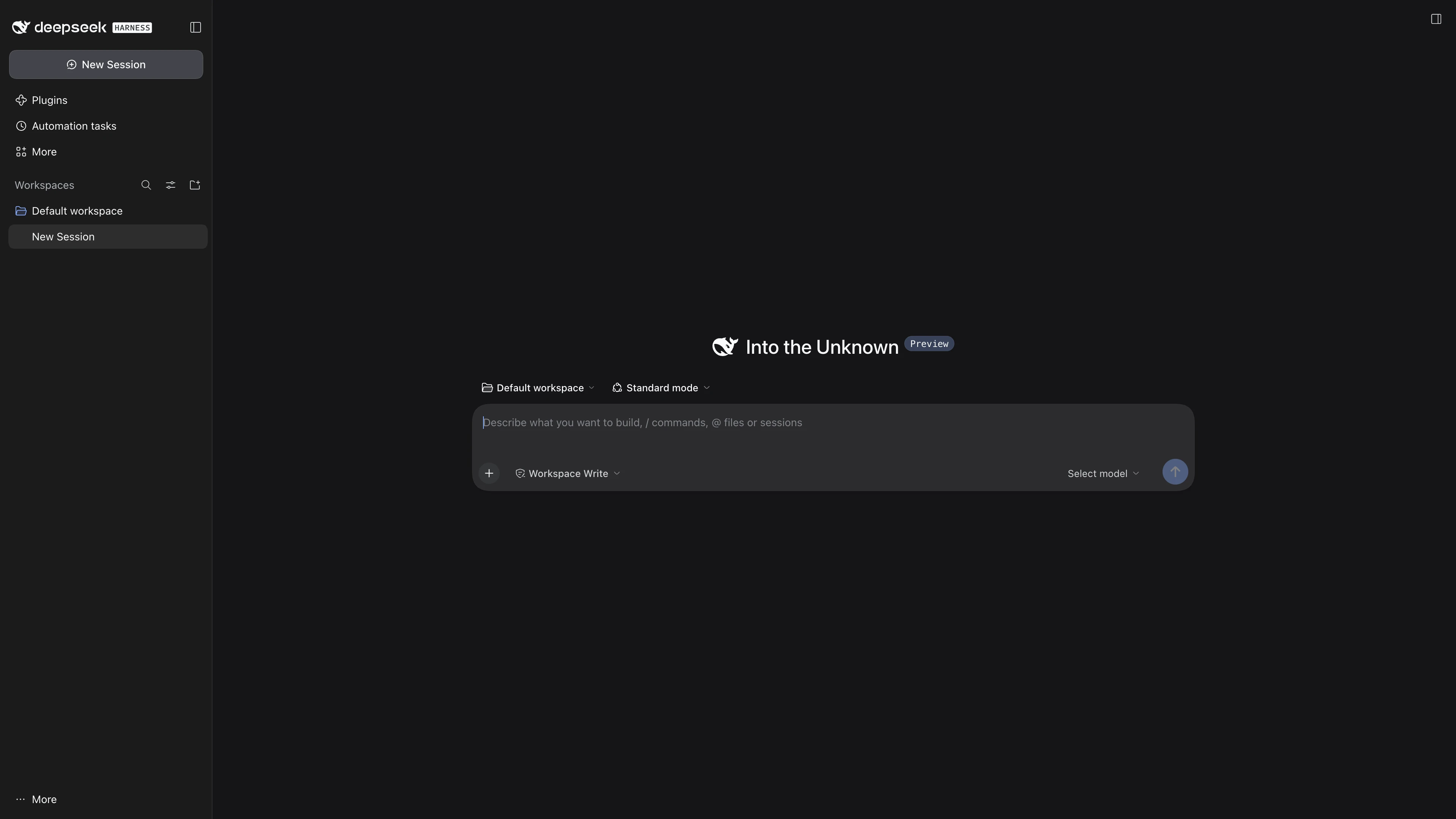
DeepSeek Harness runs one web process on port 3080. The browser UI provides interactive coding sessions, model settings, tool execution, plugins, automation tasks, and session history. The agent can read and edit files, run shell commands, and work inside the project directory selected in the UI.
The template mounts two persistent volumes: /data stores DSH profiles, credentials, settings, and session data, while /workspace stores the project files used by the agent. Both volumes survive Pod restarts and template updates.
Access uses two layers. The auth proxy requires HTTP Basic Auth with the username and password from the deployment form. After that, DeepSeek Harness requires a launch token printed by the server. Opening the tokenized URL once creates a signed browser cookie that remains valid for 30 days. The launch token is reissued whenever the container starts, while the signed cookie keeps its 30-day lifetime across restarts.
Common Use Cases
- Repository Assistance: Inspect a codebase, explain architecture, and implement focused changes.
- Coding Automation: Run shell commands, edit files, and iterate on tests inside a persistent workspace.
- AI Agent Evaluation: Compare models and providers through one coding-agent interface.
- Personal Development Workspace: Keep sessions, configuration, and project files together in one deployment.
- Tool and Plugin Prototyping: Test DeepSeek Harness plugins, skills, and agent presets.
Dependencies for DeepSeek Harness Hosting
The Sealos template includes the DeepSeek Harness web service, an auth proxy, a Service, an HTTPS Ingress, and two 1Gi persistent volumes. Application state stays inside the PVCs created by the template.
A DeepSeek API key is required to run model requests. You can add it after deployment from Settings → Models, or configure another OpenAI-compatible, Anthropic-compatible, or Gemini-compatible provider from the same page.
Deployment Dependencies
Implementation Details
Architecture Components
This template deploys:
- DeepSeek Harness StatefulSet: Runs the web UI and agent runtime as UID/GID
1000.
- Auth proxy: Runs Caddy as a sidecar on port
8080, enforces HTTP Basic Auth, and forwards authenticated requests to DeepSeek Harness on port 3080.
- Service and Ingress: Expose Service port
3080, which targets the auth proxy, through the Sealos HTTPS entry.
/data PVC: Stores $DSH_HOME, profiles, credentials, settings, and session data./workspace PVC: Stores the project directory available to agent sessions.
The upstream Docker Compose file defines one web service. This template keeps the application topology and adds the auth proxy as a security gate. It uses a StatefulSet because the application requires persistent per-instance storage.
Resource Allocation
| Component | CPU Request | CPU Limit | Memory Request | Memory Limit | Storage |
|---|
| DeepSeek Harness | 20m | 200m | 102Mi | 1024Mi | 2 × 1Gi |
| Auth proxy | 10m | 100m | 12Mi | 128Mi | - |
During validation, the web process exceeded the 512Mi limit after browser sessions and model interactions. The 768Mi test ran successfully, and the template uses the next Sealos-supported tier, 1024Mi, for production headroom. This tier passed cold start, token login, default workspace creation, model configuration, session creation, message exchange, and restart persistence. Raise DeepSeek Harness memory to 2048Mi or 4096Mi for large repositories or long agent sessions.
Configuration
- Image:
ghcr.io/yangchuansheng/deepseek-harness:v0.2.2-rc.5
- Port:
3080
- Auth proxy:
caddy:2.11.9-alpine on internal port 8080
- Public URL:
https://<app-host>.<region-domain>/
- Trusted host: The generated Ingress host
- Basic Auth: The
basic_auth_username and basic_auth_password deployment inputs, passed to the auth proxy
- Telemetry: Disabled with
DSH_TELEMETRY_DISABLED=1
- Persistence:
/data and /workspace PVCs
- Default workspace:
/workspace/deepseek-harness/default-workspace, configured through a DSH --patch overlay
- Replicas:
1
License Information
DeepSeek Harness is licensed under the MIT License. This Sealos template is provided under the repository license for Sealos templates.
Why Deploy DeepSeek Harness on Sealos?
Sealos is an AI-assisted cloud operating system built on Kubernetes. It combines deployment, operations, networking, storage, and scaling in one interface. By deploying DeepSeek Harness on Sealos, you get:
- One-Click Deployment: Open the template page and launch the application without writing Kubernetes YAML.
- Persistent Storage Included: Session history, credentials, settings, and project files survive restarts.
- Automatic HTTPS Access: Sealos provisions the public Ingress and certificate for the web UI.
- Canvas Operations: Inspect logs, adjust resources, and manage storage from resource cards.
- Pay-as-You-Go Resources: Start with the tested 300m CPU limit and 1Gi application memory.
- Simple Model Setup: Add DeepSeek or third-party providers directly in the browser UI.
Deployment Guide
- Open the DeepSeek Harness template and click Deploy Now.
- Review the generated application name, host, and Basic Auth credentials. Save the Basic Auth password before confirming the deployment.
- Wait for deployment to complete, typically 2-3 minutes. Sealos redirects you to the Canvas after the resources are created.
- Open the application URL shown in the Canvas.
- Follow Login and Access to authenticate the browser.
Login and Access
Access uses two credentials. First authenticate at the auth proxy with the Basic Auth username and password from the deployment form. Then sign in to DeepSeek Harness with the launch token from the application log.
DeepSeek Harness has no self-service registration. Access is granted by the deployment's Basic Auth credentials and the launch token.
-
Open the deployment in Sealos Canvas and open the application URL.
-
Enter the basic_auth_username and basic_auth_password values from the deployment form when the browser asks for credentials.
-
Open the DeepSeek Harness StatefulSet or Pod resource card and view its logs.
-
Find the latest line that starts with dsh web::
dsh web: https://<app-host>.<region-domain>/?token=<launch-token>
-
Open the complete URL in the browser once. DeepSeek Harness sets a signed session cookie and redirects to the clean application root.
-
Use the clean application URL for later visits. The browser keeps the Basic Auth credentials and the DeepSeek Harness cookie.
The launch token changes after every Pod or container restart. Return to the logs and open the newest dsh web: URL when the DeepSeek Harness cookie expires or the container restarts. The Basic Auth credentials stay unchanged until you update the deployment inputs.
Treat the tokenized URL as a password. It grants access to the deployment, including stored credentials and workspace files.
Select a Workspace
The first-use flow creates Default workspace automatically at /workspace/deepseek-harness/default-workspace.
To use another directory on the persistent volume:
- Click Choose workspace.
- Click Add workspace….
- Enter the directory path under
/workspace.
- Click Open.
The new session can then read and edit project files stored on the workspace volume.
Configure a Model
- Open Settings → Models.
- Enter a DeepSeek API key in the DeepSeek card and click Apply, or choose Add model provider for a compatible third-party endpoint.
- Return to the session and choose the model from the model selector.
The API key is stored under /data/.dsh/.credentials.yaml on the persistent data volume. It survives Pod restarts and template updates.
Configuration
After deployment, manage DeepSeek Harness from:
- Canvas AI Dialog: Describe resource, storage, or environment changes and let Sealos apply them.
- Resource Cards: Open the StatefulSet, Service, Ingress, or PVC cards for direct changes.
- Model Settings: Add providers, enter credentials, and manage model catalogs from Settings → Models.
- Workspace Files: Upload project files or work with files already present in
/workspace.
- Logs: Retrieve the current launch URL after a restart.
Scaling
Increase CPU or memory from the DeepSeek Harness StatefulSet resource card when sessions need more capacity:
| Workload | Suggested Memory |
|---|
| UI, configuration, short conversations | 1024Mi |
| Medium repositories and tool-heavy sessions | 2048Mi |
| Large repositories or long-running agent tasks | 4096Mi |
Keep the StatefulSet at one replica. The application uses a single shared browser session and ReadWriteOnce volumes for /data and /workspace.
Security Notes
This deployment is single-tenant. Every authenticated browser has owner access to the agent, including shell execution, stored credentials, and workspace files. Share access only with people you trust.
- The auth proxy reads the Basic Auth password from the deployment inputs and keeps it in the Pod environment. Use a unique password and keep it out of tickets and screenshots.
- The
dsh web: launch token is a root-equivalent secret. Treat the tokenized URL as a password.
- Existing 30-day browser cookies survive Pod restarts because the signing key is stored on the
/data volume. Restarting the Pod rotates the launch token; issued cookies keep their 30-day lifetime.
- The application has no per-device session revocation list. Changing the Basic Auth password stops browsers that use the old Basic Auth credential; existing DeepSeek Harness cookies remain valid until they expire or
/data is reset.
- To force a full reset, redeploy with a fresh
/data volume. This clears credentials, settings, and session data; back up /workspace first if you need to keep project files.
- For multi-user access or account-level revocation, replace the auth proxy with an OAuth2 or SSO proxy. Basic Auth provides one shared credential.
Troubleshooting
The browser keeps asking for Basic Auth
Enter the basic_auth_username and basic_auth_password values from the deployment form. If the browser cached old credentials, open a private window or clear the saved credentials for this host.
DeepSeek Harness returns 401
The browser has no valid session cookie. Open the latest dsh web: token URL from the Pod logs. After a Pod restart, fetch the new token.
The default workspace is unavailable
Open Choose workspace → Add workspace…, enter a directory under /workspace, and click Open. Confirm the /workspace volume is mounted and writable by UID 1000.
No models are available
Open Settings → Models and add a DeepSeek API key or a custom model provider.
The login URL no longer works
The launch token is bound to the current container process. Copy the newest dsh web: line from the Pod logs.
The UI becomes slow during large tasks
Raise the StatefulSet memory limit to 2048Mi or 4096Mi. Keep the replica count at one.
Additional Resources
License
This Sealos template is provided under the repository license for Sealos templates. DeepSeek Harness is licensed under the MIT License.
