Complete Production Deployment Checklist for React on Sealos
Launch React on Sealos with a production checklist for static app serving, Sealos plugin deploys, env vars, API services, domains, HTTPS, monitoring, and rollback.
A React production deployment on Sealos is ready when the static frontend, generated Sealos resources, environment variables, API/service dependencies, domain, monitoring, and rollback path have all been verified.
Use this checklist before launch, before a major release, or before switching real traffic to a new Sealos deployment.
If this is your first deploy, start with How to Deploy a React App to Sealos in 5 Minutes. If your React app uses PostgreSQL, read React + PostgreSQL Full-Stack Deployment Guide on Sealos before using this production checklist.
Key takeaways
| Question | Production answer |
|---|---|
| How should production deploys start? | Use the Sealos plugin to analyze the repo, generate the app resources, and deploy or update through recorded .sealos/ state. |
| What is React-specific? | Verify npm run build, dist/, static app serving, browser-safe env vars, and the containerized web server. |
| What if the app uses an API/service? | Verify API/service compatibility, server/API secrets, logs, health checks, and any backend-to-PostgreSQL path. |
| How should rollback work? | Roll back the frontend image or static bundle, then verify API/service compatibility and Runtime Truth Pass. |
Who this checklist is for
Use this checklist if:
- You deploy a React app to Sealos
- You use the Sealos plugin through Codex, Codex App, or Claude Code
- Your app depends on build-time public values such as
VITE_API_BASE_URL - Your app calls an API/service layer or uses PostgreSQL through a backend
- Your app needs a custom domain or stable public URL
- You want a repeatable launch, update, and rollback process
This is a production checklist. It assumes the app already builds locally or has already been deployed once to Sealos.
Install the Sealos plugin for production checks
Install the Sealos plugin before using this checklist. One plugin installs deploy, database, S3, canvas, app-builder, and supporting cloud-native skills from root skills/**.
For Codex CLI or Codex App, use the native Codex marketplace flow:
For Codex compatibility or local testing, use:
For Claude Code, use the native Claude Code marketplace flow:
For Claude Code compatibility, use:
After installation, run production deployment requests through the host entry that matches your workspace:
- Codex CLI: start prompts with
$sealos - Codex App: click
+->Plugins->Sealos - Claude Code: start prompts with
/sealos
Production launch model
A production React deployment should follow the same Sealos deployment model used in the first two guides:
Use DEPLOY for a fresh production release when .sealos/state.json is missing, stale, broken, manually edited, or points to a deployment the live cluster cannot verify. Use UPDATE when .sealos/state.json has a valid last_deploy and live runtime verification confirms the existing deployment still matches the recorded app.
For a PostgreSQL-backed React app, keep the frontend, API/service layer, and database in one deployment plan:
That request should generate the React frontend resource, API/service resource, PostgreSQL resource, database connection env var, required inputs, and Sealos template together.
Production readiness scorecard
Before launch, aim for this state:
Do not treat a one-time homepage load as production evidence. Runtime Truth Pass is the launch gate.
1. Build and image checklist
Your React app should build cleanly from a fresh checkout.
Run the command that matches your package manager:
Production checklist:
package.jsonhas a workingbuildscript- The lockfile is committed
npm run buildor the equivalent command emitsdist/- The app does not require local-only files
- The image serves
dist/through a containerized web server - The container listens on
0.0.0.0 .sealos/template/index.yamlexposes the same runtime port as the web server- The image targets linux/amd64
- The image tag is unique and not
latest - The runtime image does not include unnecessary dev files
- A health endpoint or stable homepage smoke path exists
- Docker and buildx are available if the repo has no reusable linux/amd64 image
- Private GHCR images have an app-scoped image pull Secret before rollout
Example production runtime model:
2. Sealos plugin state checklist
After the first deployment, the Sealos plugin records state under .sealos/.
Expected files:
Production checklist:
.sealos/analysis.jsonreflects the current React app type, package manager, output directory, runtime port, env var names, and API/service signals.sealos/template/index.yamlmatches the intended image, port, environment variables, Service, Ingress, and App resource.sealos/state.jsoncontainslast_deploywith the last accepted app name, namespace, image, App URL, and boundedhistory.sealos/state.jsonwas written after successful deployment and Runtime Truth Pass acceptance- DEPLOY mode is used for missing, stale, broken, or unverifiable state
- UPDATE mode is used only when recorded state and live runtime verification agree
- Stale state has an explicit path: cluster discovery, state repair, or fresh deploy
- You know whether the next release updates the existing app or creates a new instance
- If an API/service is used, the template includes backend resources and server/API secrets stay server-side
- If the image is a private GHCR image built by Sealos, the deployment has the matching app-scoped image pull Secret
This matters because update mode preserves deployment identity, rollout history, and traffic ownership for production releases.
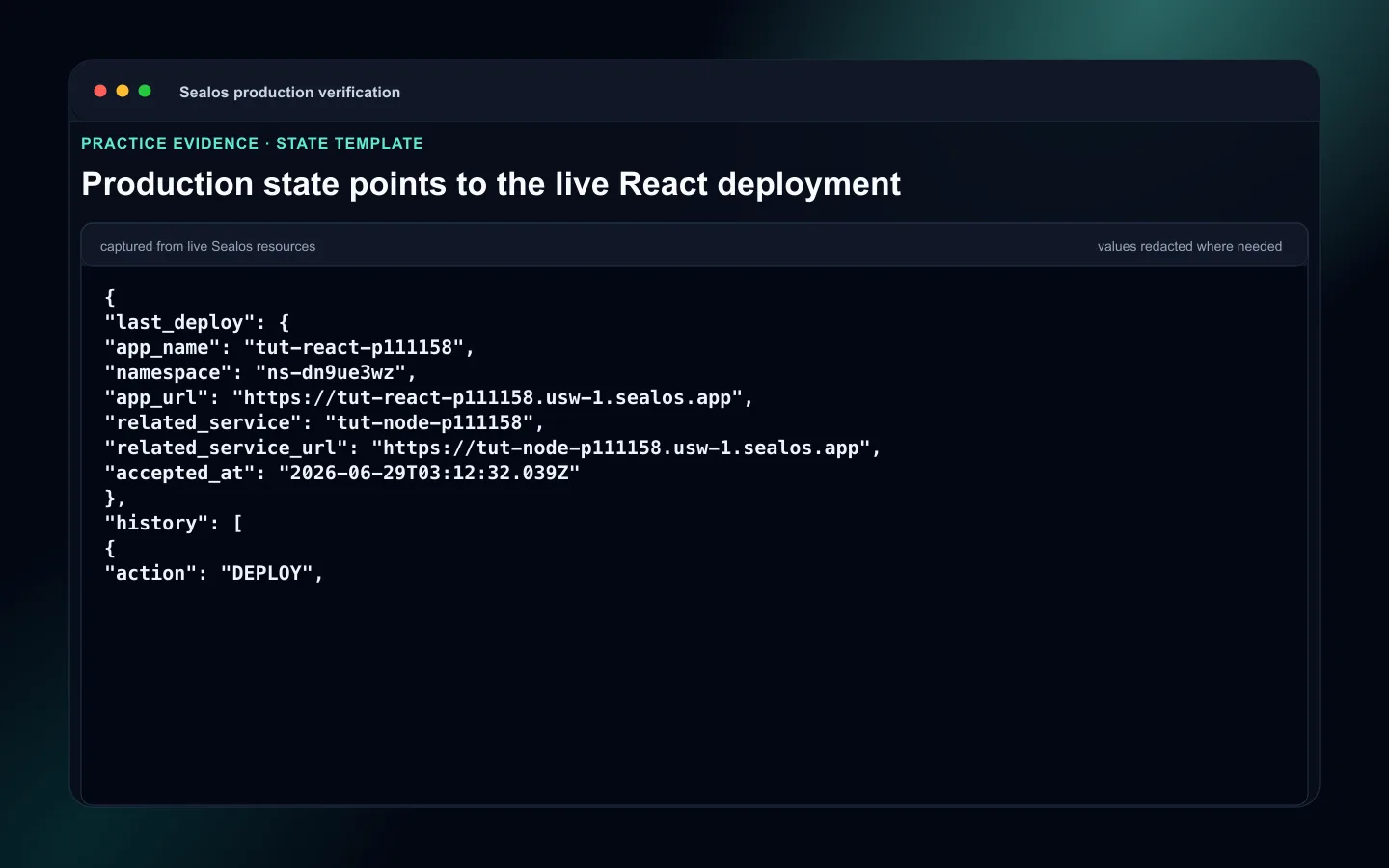 React production .sealos state and template review
3. Environment variable checklist
Production React apps often fail because env vars are split across build time, browser code, and backend services.
Classify every env var:
| Type | Example | Where it belongs |
|---|---|---|
| Public browser value | VITE_API_BASE_URL | Safe to expose |
| Public app URL | VITE_PUBLIC_APP_URL | Safe to expose |
| Server secret | AUTH_SECRET | API/service env vars only |
| Database connection | DATABASE_URL, POSTGRES_URL | Generated from the Sealos database resource into the API/service |
| Third-party API key | STRIPE_SECRET_KEY | API/service env vars only |
Production checklist:
.env.examplelists placeholders, not real secrets.env,.env.local, and production secret files are ignored by git- No secret starts with
VITE_ - Browser-safe env vars are intentionally public
- API/service secrets are configured in Sealos for the backend resource
- The React image is rebuilt after changing
VITE_values because the bundle contains build-time public values - OAuth callback URLs, webhook URLs, and allowed origins use the production domain
For PostgreSQL apps, keep database credentials in the API/service layer. A browser bundle should call the API/service, then the backend reads DATABASE_URL, POSTGRES_URL, or the actual database key.
See: Sealos Environment Variables
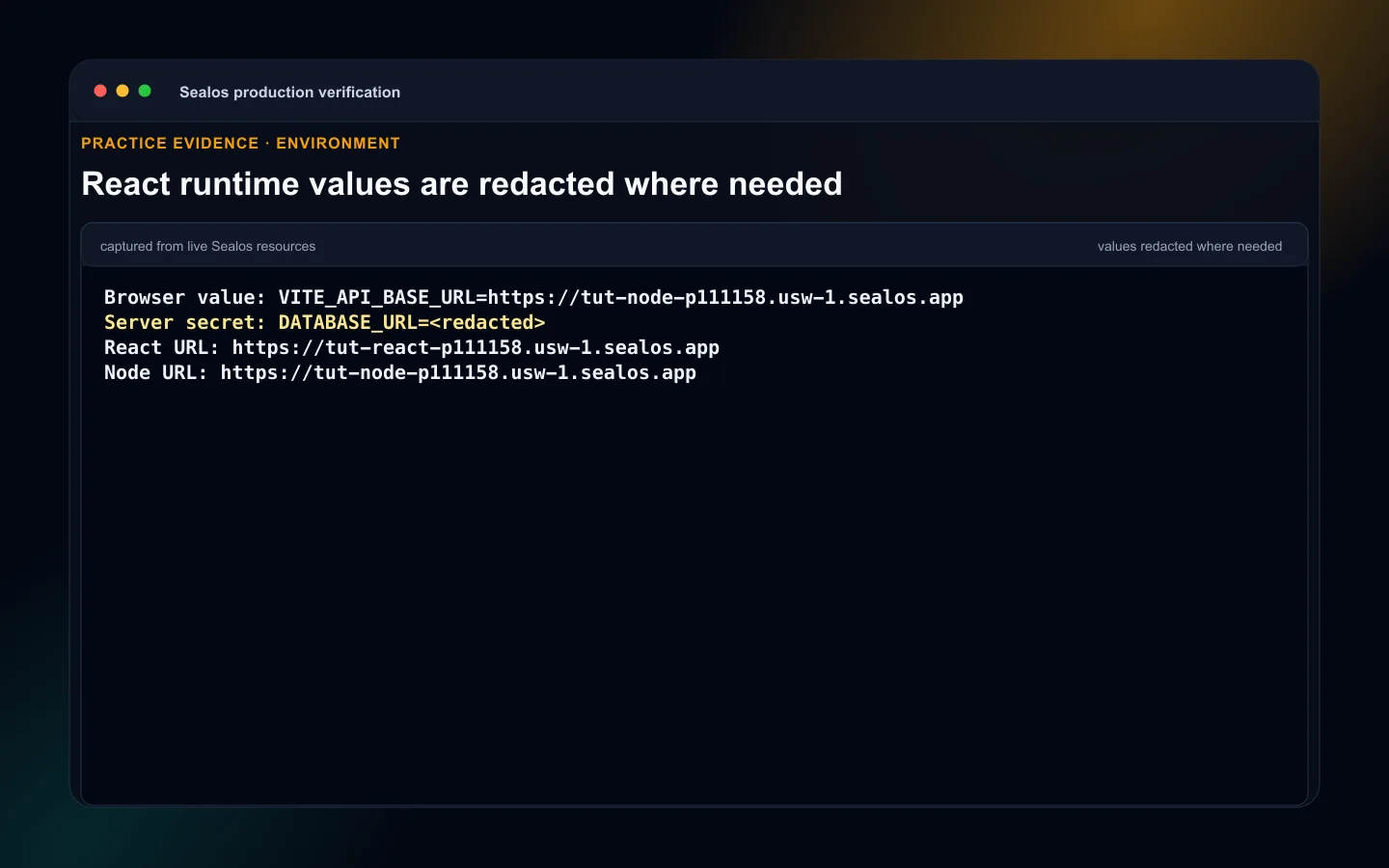 React production environment sources with VITE values separated from API secrets
4. API/service and PostgreSQL checklist when present
If your React app calls an API or uses PostgreSQL through a backend, production readiness spans both the frontend and backend.
Production checklist:
- The React frontend points at the production API URL
- CORS or allowed origins include the production frontend domain
- API/service logs are visible in Sealos
- Health checks cover API/service readiness
- Database env keys are server-side only
- Migrations are committed and repeatable
- Migration command is documented
- Migrations run before traffic reaches code that depends on the new schema
- Runtime Truth Pass includes frontend-to-API behavior
- PostgreSQL-backed flows include backend-to-PostgreSQL read/write evidence
- Rollback includes API/service compatibility with the restored frontend bundle
Common migration commands:
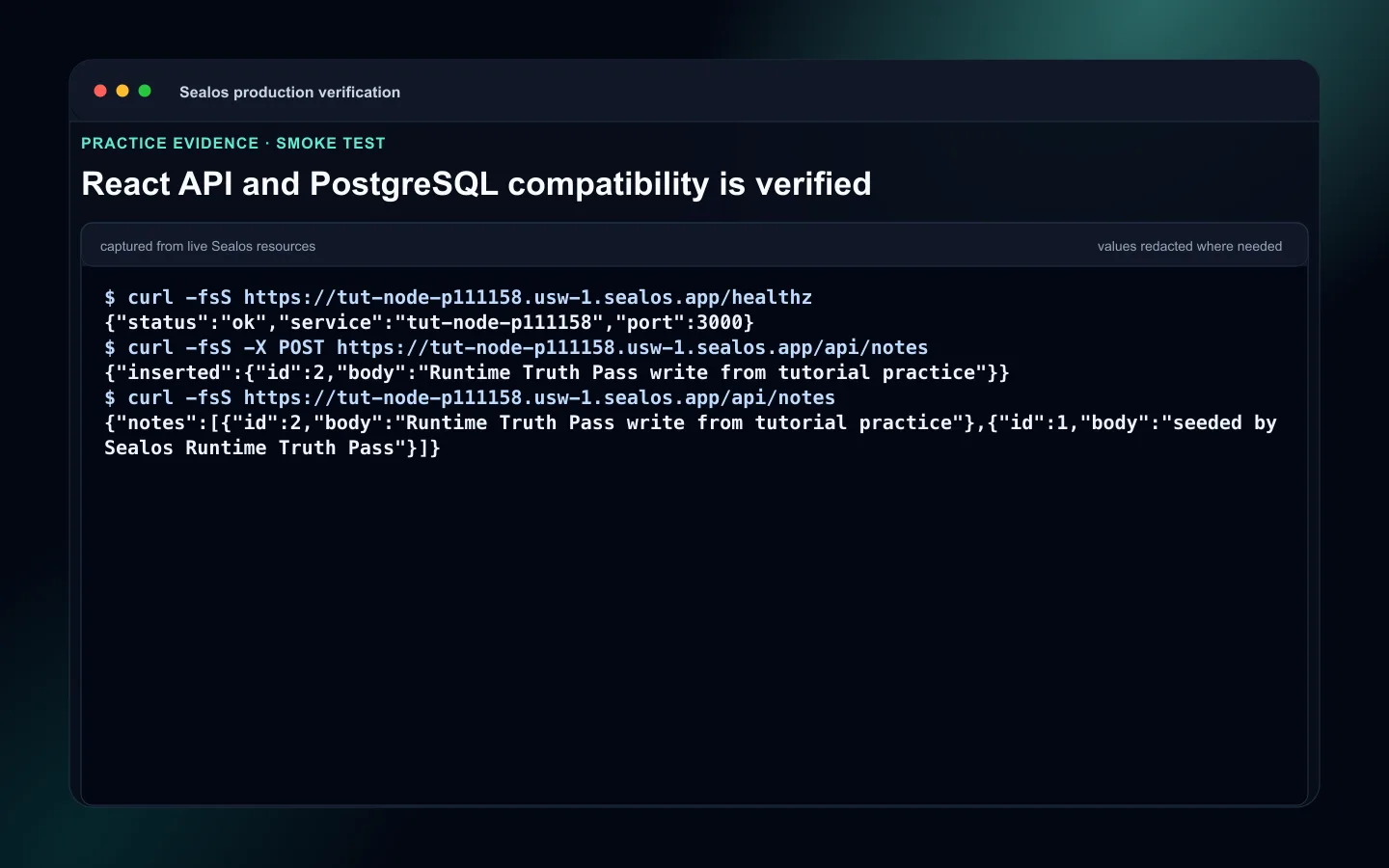 React API and PostgreSQL compatibility checks for production
5. Persistent storage checklist
A container filesystem is not durable storage.
Static React frontends should stay disposable. Use persistent storage only when a backend service writes files that must survive restart or redeploy.
Examples:
- Uploaded avatars
- Generated reports
- Local media files
- Temporary exports that users expect to download later
Production checklist:
- The React frontend does not store important user data in the container filesystem
- File uploads use object storage or a mounted persistent volume on the writing service
- The exact in-container mount path is known
- A restart and redeploy test proves files survive
- Multi-instance behavior is safe if autoscaling is enabled
- PostgreSQL data is handled by the database resource
See: Sealos Persistent Storage
6. Custom domain and HTTPS checklist
Do not launch a production React app on an unplanned temporary URL.
Production checklist:
- Public access is enabled
- The Sealos-generated URL works before you attach a domain
- A custom domain or subdomain is selected
- DNS provider access is available
- A
CNAMErecord points to the Sealos-generated address - DNS propagation is verified
- HTTPS works on the custom domain
- The old deployment or old host remains available until the new domain is verified
VITE_PUBLIC_APP_URL,VITE_API_BASE_URL, OAuth redirects, webhook URLs, and allowed origins use the production domain
For API-backed apps, update provider settings too:
- OAuth callback URL
- Webhook endpoint
- Email link base URL
- Allowed origin list
See: Sealos Domains and Public Access
7. Scaling checklist
React static serving is usually easy to scale, but coupled backend services need their own review.
Production checklist:
- The static frontend can run with more than one replica
- API/service session state is stored in PostgreSQL, Redis, or another shared store
- Uploaded files are not stored on one container instance
- Background jobs do not run duplicated unsafe work on every replica
- Cache invalidation works across API/service instances
- Autoscaling min and max values are set intentionally
- CPU and memory limits match real traffic expectations
- Health checks and smoke tests confirm both frontend and API/service behavior under traffic
- Migrations do not run concurrently from every replica in an unsafe way
Start with one instance for backend services until horizontal safety is proven.
See: Sealos Scaling
8. Monitoring and logs checklist
You need to know when production is broken before users report it.
Runtime Truth Pass is the launch gate for production. Treat homepage load as one signal inside acceptance, then prove the real runtime with app-specific checks before calling the release ready.
Production checklist:
- Frontend logs are visible in Sealos
- API/service logs are visible when a backend exists
- Build and deploy logs are retained
- Server errors are reported to an error tracking tool
- The actual App URL opens from a fresh session
- Custom domain and HTTPS work when the release uses a production domain
- Public URL uptime is monitored
- Health checks return a non-5xx response
- Static assets load from the built
dist/bundle - Logs after smoke are checked for startup, API, database, browser, and access-control failures
- Resource footprint matches the intended Instance, App, Deployment, Service, Ingress, Secrets, PVCs, Pods, and database resources when present
- API-backed flows complete at least one real user path
- Slow requests are measurable
- The team knows where to look first during an incident
9. Backup checklist
Backups are part of production when the React app depends on durable backend state.
Production checklist:
- PostgreSQL backup policy is known when a database is used
- Restore procedure is tested or documented
- Persistent volume backup plan exists if file storage is used
- Object storage bucket lifecycle is understood if uploads are stored there
- Before major releases, database and storage recovery points are created where available
- Backup ownership is clear
- The team knows who can restore data and how long it takes
For database-backed React apps, the riskiest deployment is usually the schema change behind the API/service.
Before schema-changing releases:
- Confirm migration direction
- Confirm rollback direction
- Back up the database
- Keep the previous frontend image and API/service image available
- Record the deployed image before updating
- Decide what happens to user data written after the release
10. Update and rollback checklist
The Sealos deploy skill supports a day-2 update path.
When .sealos/state.json contains a valid previous deployment, the skill can detect the running app and offer to update it instead of creating a new one. The state file is only the starting point: the recorded runtime must still exist, and the current App URL should pass live verification.
Production update flow:
Production checklist:
- Previous frontend image tag or static bundle version is known
- New image tag is unique, not
latest .sealos/state.jsonhas a validlast_deploy- Live runtime verification confirms the recorded deployment still exists
- Fresh deploy, cluster discovery, or state repair is selected when state is missing, stale, broken, or unverifiable
- New frontend image is built or an approved linux/amd64 image is reused
- Rollout verification is required
- Failed rollout triggers frontend image rollback or static bundle rollback
- API/service compatibility is checked before and after frontend rollback
- Private GHCR pull Secret is refreshed before swapping to a new private image
.sealos/state.jsonreceives a bounded append-onlyhistoryentry after runtime acceptance- Database migrations are reviewed separately from frontend rollback
- Operators know when to rollback frontend, API/service, database state, or several together
- The rollback runbook has an owner and a time limit
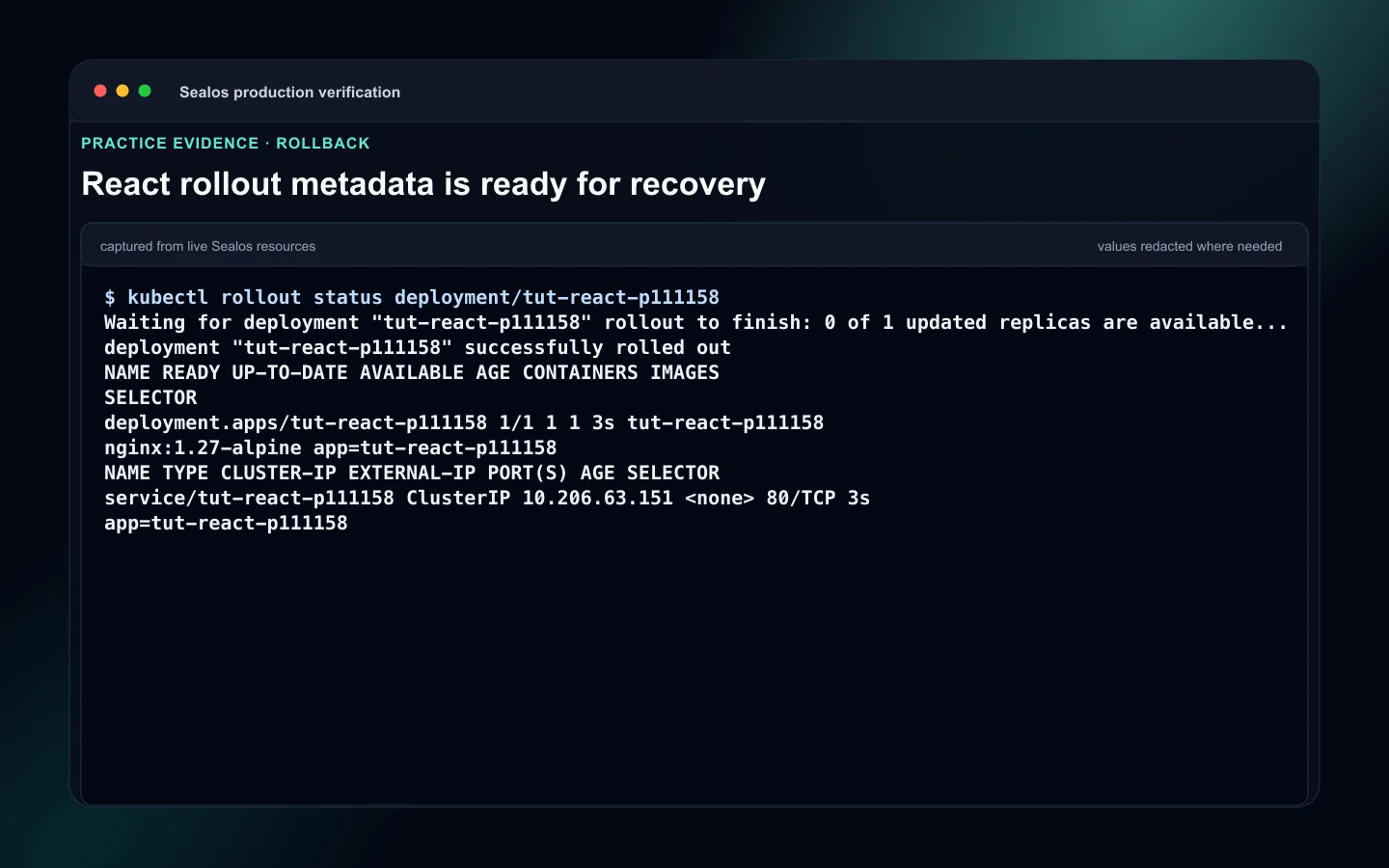 React rollback readiness for previous frontend image or static bundle
11. Security checklist
Production checklist:
- No secret starts with
VITE_ - No PostgreSQL credential appears in browser HTML or JavaScript
.env.exampleuses placeholders.sealos/analysis.json,.sealos/template/index.yaml, and.sealos/state.jsonare reviewed before commit- API/service secrets stay in Sealos env vars
- OAuth redirect URLs and allowed origins match the production domain
- Private image pull Secrets are scoped to the deployed app
- Runtime logs do not print raw secrets
- CORS rules allow the production frontend and block unknown origins
Launch Runbook
Use this runbook for the final launch:
- Run a clean dependency install.
- Run
npm run buildand confirmdist/. - Ask Sealos to DEPLOY or UPDATE based on
.sealos/state.jsonand live runtime verification. - Review
.sealos/analysis.jsonand.sealos/template/index.yaml. - Configure browser-safe env vars and server/API secrets in the correct resources.
- Deploy or update through the Sealos plugin.
- Verify rollout, logs, health checks, custom domain, HTTPS, and resource footprint.
- Run Runtime Truth Pass against the public frontend and any required API-backed path.
- Record previous image or static bundle information for rollback.
- Confirm
.sealos/state.jsonrecords the accepted runtime proof.
Common production failures
1. React bundle points to localhost
Fix:
- Set
VITE_API_BASE_URLto the production API/service URL - Rebuild the frontend image
- Redeploy or update after the new bundle is built
2. Secrets leaked into browser env vars
Fix:
- Remove secret values from
VITE_keys - Rotate exposed credentials
- Move the secret to the API/service environment
- Rebuild and redeploy the frontend
3. UPDATE targets stale state
Fix:
- Compare
.sealos/state.jsonwith live runtime verification - Use cluster discovery, state repair, or a fresh DEPLOY when state is unverifiable
- Accept new state only after Runtime Truth Pass
4. Frontend rollback breaks API compatibility
Fix:
- Restore the previous frontend image or static bundle
- Confirm the API/service still supports the restored frontend contract
- Check logs and health checks after rollback
- Decide whether API/service rollback is also required
Final production checklist
- Build output:
npm run buildproducesdist/ - Static serving: containerized web server serves the bundle
- State:
.sealos/analysis.json,.sealos/template/index.yaml, and.sealos/state.jsonreviewed - Mode: DEPLOY or UPDATE selected from valid state plus live runtime verification
- Env:
VITE_browser-safe values and server/API secrets separated - Domain: custom domain and HTTPS verified
- Logs: frontend and API/service logs checked after smoke
- Health checks: frontend and API/service paths return non-5xx responses
- Footprint: resource footprint matches the expected Sealos resources
- Rollback: frontend image rollback or static bundle rollback is ready
- Compatibility: API/service compatibility is verified when relevant
- Acceptance: Runtime Truth Pass is complete
Next steps
- Review first-deploy basics in How to Deploy a React App to Sealos in 5 Minutes
- Review database deployment in React + PostgreSQL Full-Stack Deployment Guide on Sealos
- Open Sealos Skills when you need the plugin workflow reference
FAQ
Keep building
Continue this Sealos path
 Sealos
Unify Your Entire Workflow.
Code in a ready-to-use cloud environment, deploy with a click. Sealos combines the entire dev-to-prod lifecycle into one seamless platform. No more context switching.


Explore with AI
Get AI insights on this article