Complete Production Deployment Checklist for Next.js on Sealos
Launch Next.js on Sealos with a production checklist for Sealos plugin deploys, env vars, PostgreSQL, domains, HTTPS, backups, monitoring, and rollback.
A Next.js production deployment on Sealos is ready only when the app, generated Sealos resources, environment variables, database, domain, monitoring, backups, and rollback path have all been verified. A homepage that loads once is not enough.
Use this checklist before launch, before a major release, or before switching real traffic to a new Sealos deployment.
If this is your first deploy, start with How to Deploy a Next.js App to Sealos in 5 Minutes. If your app uses PostgreSQL, read Next.js + PostgreSQL Full-Stack Deployment Guide on Sealos before using this production checklist.
Key takeaways
| Question | Production answer |
|---|---|
| How should production deploys start? | Use the Sealos plugin to analyze the repo, generate the app resources, and deploy or update through the recorded .sealos/ state. |
| What if the app uses PostgreSQL? | Ask Sealos for one full-stack deployment so the app resource, PostgreSQL resource, database env var, and template are generated together. |
| Which database env var should be checked? | Check the key the app actually reads, such as DATABASE_URL, POSTGRES_URL, or POSTGRES_PRISMA_URL. |
| Is Docker always required? | Docker is required when Sealos must build and push an image and no reusable linux/amd64 image already exists. |
| How should schema-changing releases roll back? | Rollback must coordinate app code, database state, and user data written after release. |
Who this checklist is for
Use this checklist if:
- You deploy a Next.js app to Sealos
- You use the Sealos plugin through Codex, Codex App, or Claude Code
- Your app has server-side code, API routes, auth, background work, or a database
- Your app needs a custom domain or stable public URL
- You want a repeatable launch, update, and rollback process
This is a production checklist. It assumes the app already builds locally or has already been deployed once to Sealos.
Install the Sealos plugin for production checks
Install the Sealos plugin before using this checklist. One plugin installs deploy, database, S3, canvas, app-builder, and supporting cloud-native skills from root skills/**.
For Codex CLI or Codex App, use the native Codex marketplace flow:
For Codex compatibility or local testing, use:
For Claude Code, use the native Claude Code marketplace flow:
For Claude Code compatibility, use:
After installation, run production deployment requests through the host entry that matches your workspace:
- Codex CLI: start prompts with
$sealos - Codex App: click
+->Plugins->Sealos - Claude Code: start prompts with
/sealos
Production launch model
A production Next.js deployment should follow the same Sealos deployment model used in the first two guides:
Use DEPLOY for a fresh production release when .sealos/state.json is missing,
stale, broken, manually edited, or points to a deployment the live cluster
cannot verify. Use UPDATE when .sealos/state.json has a valid last_deploy
and the live Kubernetes Deployment still exists in the recorded namespace. If
state and cluster truth disagree, route the run through cluster discovery,
state repair, or a fresh deploy before switching traffic.
For a PostgreSQL-backed app, keep the app and database in one deployment plan:
That request should generate the app resource, PostgreSQL resource, database connection env var, required inputs, and Sealos template together. Do not make the production default “create database first, then deploy app separately.”
Production readiness scorecard
Before launch, aim for this state:
Do not treat “works locally” or “the homepage loaded once” as production evidence.
1. Build and image checklist
Your Next.js app should build cleanly from a fresh checkout.
Run the command that matches your package manager:
If your repo relies on Corepack, make the package manager version explicit in package.json before production:
This avoids a mismatch where one environment runs a different pnpm version than the one used during your local production test.
Production checklist:
package.jsonhas a workingbuildscriptpackage.jsonpinspackageManagerwhen Corepack is used- The lockfile is committed
- The app does not require local-only files
- The app can run on
PORT=3000or a documented custom port - The container listens on
0.0.0.0, not onlylocalhost - The image targets linux/amd64
- The image tag is unique and not
latest - The runtime image does not include unnecessary dev files
- A health endpoint exists, or you add one before launch, for example
/api/health - Docker and buildx are available if the repo has no reusable linux/amd64 image
- Private GHCR images have an app-scoped image pull Secret before rollout
Recommended next.config.mjs:
Recommended runtime env:
If the Sealos plugin needs to build the image, make sure your local environment has Docker available. If Docker is missing, the deploy can still analyze the repo and detect reusable images, but it cannot complete a local build and push path.
Some Next.js apps read server-only env vars during next build, especially when pages or layouts are statically evaluated. If the app reads a database URL during build, use a safe build-time placeholder for the build step and the real generated database URL for runtime. For example, the verified Next.js + PostgreSQL template reads POSTGRES_URL during build, so pnpm build fails without a placeholder even before deployment begins.
Do not use a build placeholder as the real production database value.
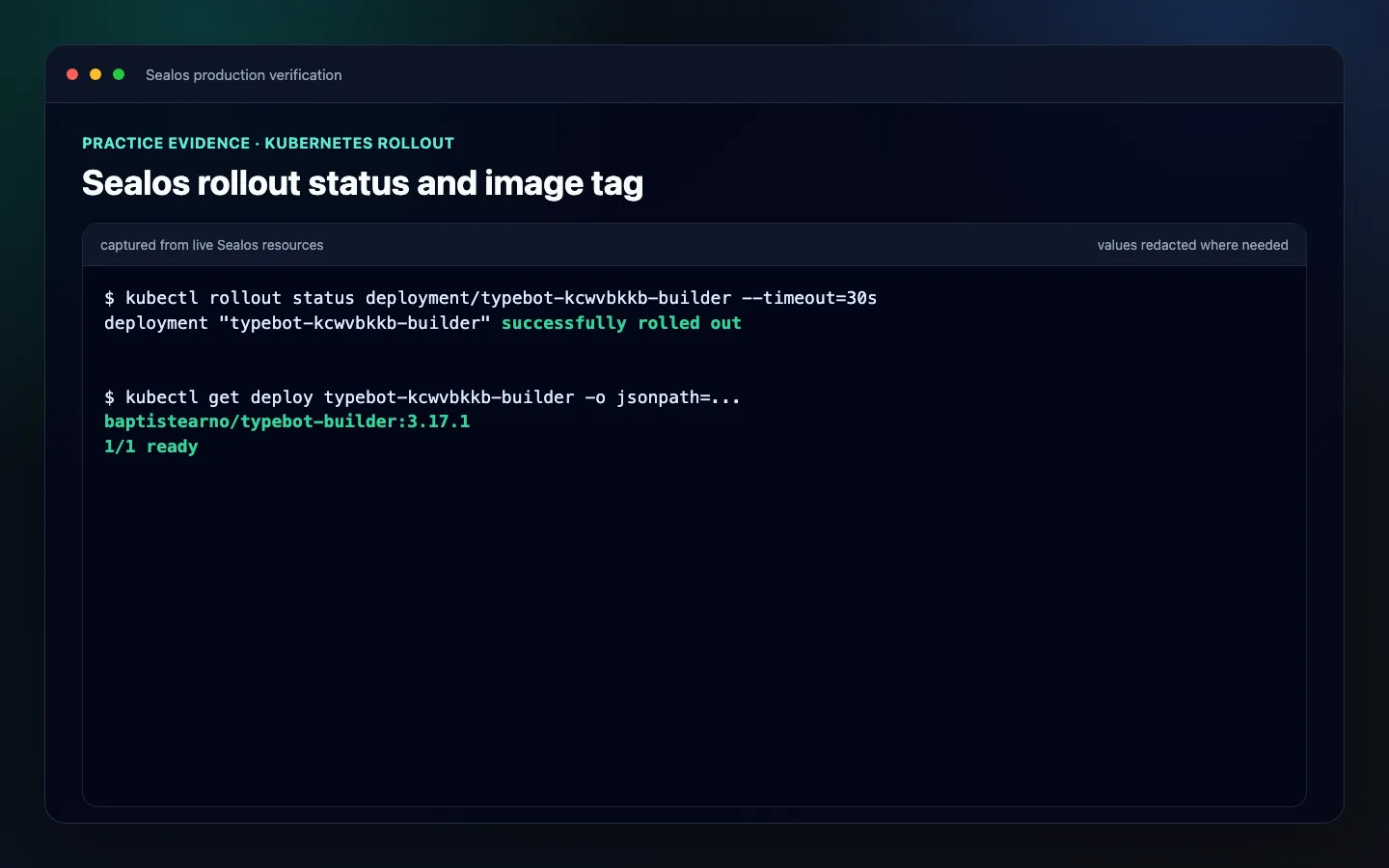 Sealos rollout status showing a successful deployment, image tag, and one ready replica
2. Sealos plugin state checklist
After the first deployment, the Sealos plugin records state under .sealos/.
Expected files:
Production checklist:
.sealos/analysis.jsonreflects the current app type, framework, port, package manager, database signals, and env var names.sealos/template/index.yamlmatches the intended image, port, environment variables, Service, Ingress, and App CRD.sealos/state.jsoncontainslast_deploywith the last accepted app name, namespace, image, App URL, and boundedhistory.sealos/state.jsonwas written after successful deployment and Runtime Truth Pass acceptance- DEPLOY mode is used for missing, stale, broken, or unverifiable state
- UPDATE mode is used only when
last_deploymatches a live Kubernetes Deployment in the recorded namespace - Stale state has an explicit path: cluster discovery, state repair, or fresh deploy
- You know whether the next release updates the existing app or creates a new instance
- If PostgreSQL is used, the template includes the generated PostgreSQL resource and the app’s actual database env key
- Required inputs such as OAuth client IDs and secrets are filled before live deployment
- If the image is a private GHCR image built by Sealos, the deployment has the matching app-scoped image pull Secret
- If you manually edit the template, validate or dry-run it before using it for production
This matters because update mode preserves deployment identity, rollout history, and traffic ownership for production releases.
A Template API dry-run is necessary but not sufficient. It can prove that Kubernetes resources are renderable, but it may still accept empty required inputs such as AUTH_GITHUB_ID or AUTH_GITHUB_SECRET. Treat dry-run as a resource validation step, then separately verify that every required production input has a real value.
3. Environment variable checklist
Production Next.js apps often fail because env vars are split across build time, runtime, server-only code, and browser code.
Classify every env var:
| Type | Example | Where it belongs |
|---|---|---|
| Public browser value | NEXT_PUBLIC_APP_URL | Safe to expose |
| Server secret | AUTH_SECRET | Sealos env vars only |
| Database connection | DATABASE_URL, POSTGRES_URL | Generated from the Sealos database resource |
| Third-party API key | STRIPE_SECRET_KEY | Sealos env vars only |
| Auth callback URL | NEXTAUTH_URL, AUTH_URL | Production domain |
| Build placeholder | temporary database URL | Build stage only when needed |
Production checklist:
.env.examplelists placeholders, not real secrets.env,.env.local, and production secret files are ignored by git- No secret starts with
NEXT_PUBLIC_ - The app’s actual database env key is identified from
.env.exampleand source code - Required runtime values are configured in Sealos
- Build-time placeholders are not used as real production values
- Auth, payment, email, and database secrets are rotated before launch if they were shared during testing
- OAuth callback URLs and app base URLs use the production domain
For PostgreSQL apps, do not assume the key is always DATABASE_URL. Some Next.js templates use POSTGRES_URL, POSTGRES_PRISMA_URL, or another project-specific key. The production check is: does the deployed app have the same env key the code reads?
See: Sealos Environment Variables
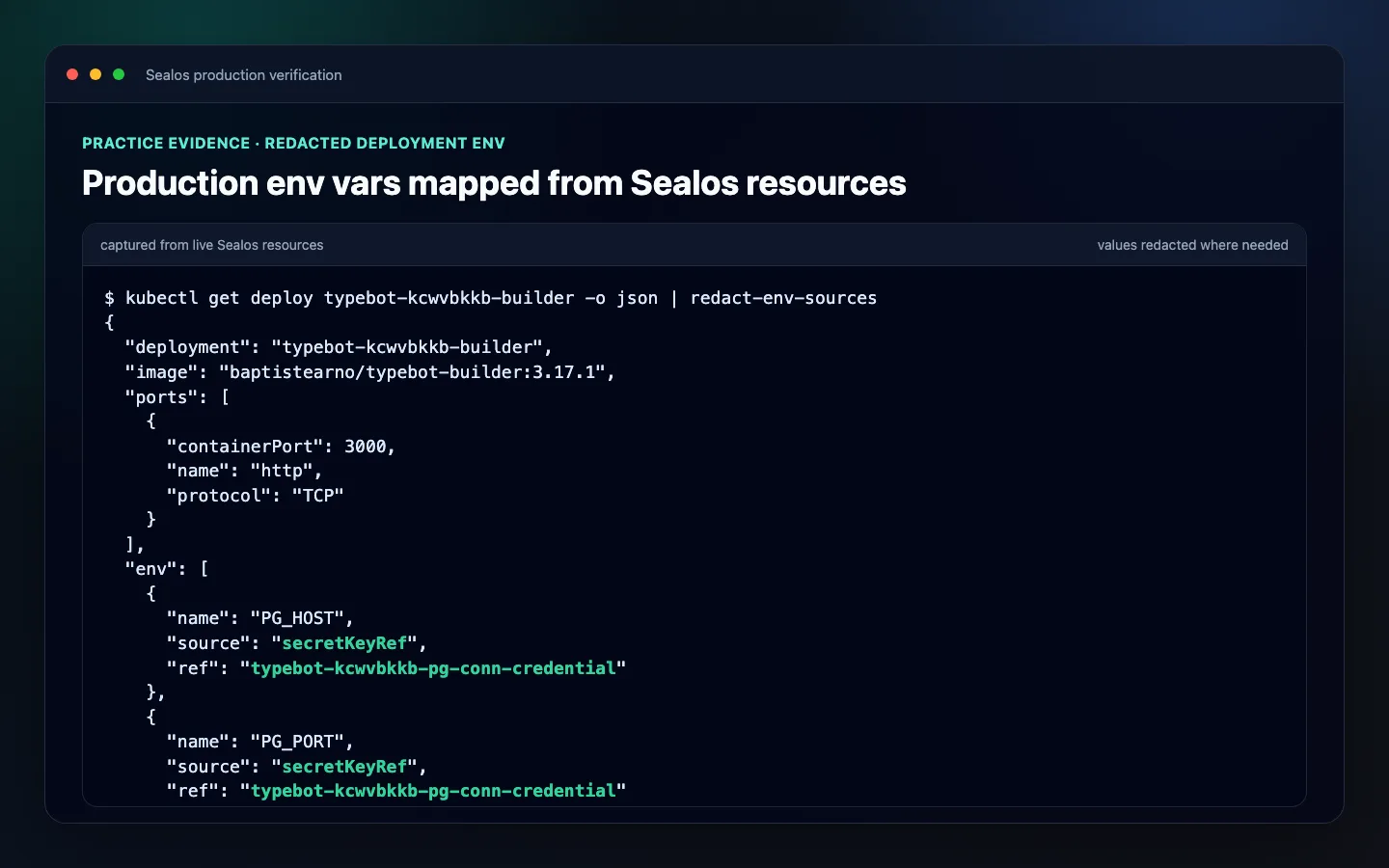 Redacted Sealos deployment environment variable sources for a Next.js app
4. PostgreSQL and migration checklist
If your app uses PostgreSQL, production readiness depends on schema safety and the real database path.
Production checklist:
- PostgreSQL is generated or managed as a Sealos database resource
- The app and PostgreSQL resource are part of the same Sealos deployment plan when using the one-request flow
- The app’s actual database env key is wired from the generated PostgreSQL resource
- The production database is not the same as a local development database
- Migrations are committed and repeatable
- Migration command is documented
- Migration command has been tested against a staging or preview database
- App startup does not serve traffic before required migrations complete
- No production path uses SQLite unless intentionally accepted
- Database backups are enabled or documented
- Restore procedure is known before launch
Common migration commands:
First verify that the repository actually has a migration system. Some templates use an ORM for query building but still document manual SQL setup instead of shipping prisma migrations, a drizzle.config.ts, or a db:migrate script. Convert that SQL into a repeatable migration or an initialization job before calling the deployment production-ready.
For Next.js standalone output, verify ORM dependencies are available at runtime if migrations run inside the container.
If you see:
the runtime image is missing required migration or ORM packages.
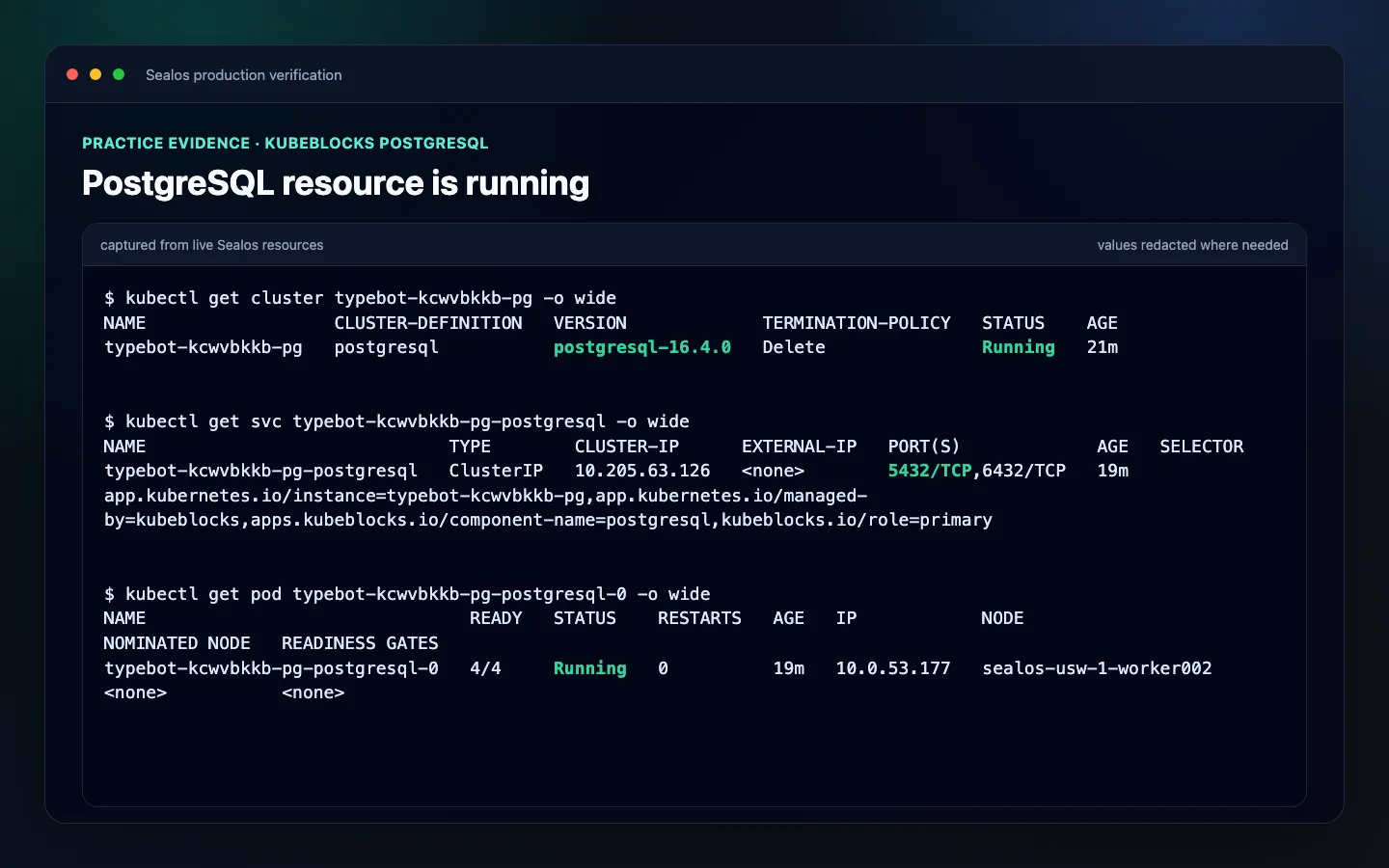 Sealos PostgreSQL cluster, service, and pod running for the practiced deployment
5. Persistent storage checklist
A container filesystem is not durable storage.
Use persistent storage only when the Next.js app writes files that must survive restart or redeploy.
Examples:
- User uploads
- Generated reports
- Local media files
- CMS content written to disk
- Temporary exports that users expect to download later
Production checklist:
- The app does not store important user data in the container filesystem
- File uploads use object storage or a mounted persistent volume
- The exact in-container mount path is known
- A restart and redeploy test proves files survive
- Multi-instance behavior is safe if autoscaling is enabled
- PostgreSQL data is handled by the database resource, not by an app volume
Do not mount storage to a guessed path. If the path is wrong, the app can appear healthy while data still disappears after redeploy.
See: Sealos Persistent Storage
6. Custom domain and HTTPS checklist
Do not launch a production Next.js app on an unplanned temporary URL.
Production checklist:
- Public access is enabled
- The Sealos-generated URL works before you attach a domain
- A custom domain or subdomain is selected
- DNS provider access is available
- A
CNAMErecord points to the Sealos-generated address - DNS propagation is verified
- HTTPS works on the custom domain
- The old deployment or old host remains available until the new domain is verified
NEXT_PUBLIC_APP_URL,NEXTAUTH_URL,AUTH_URL, OAuth redirects, and webhook URLs use the production domain
For auth apps, update provider settings too:
- GitHub OAuth callback URL
- Google OAuth redirect URI
- Stripe webhook endpoint
- Email link base URL
- Any allowed origin list
See: Sealos Domains and Public Access
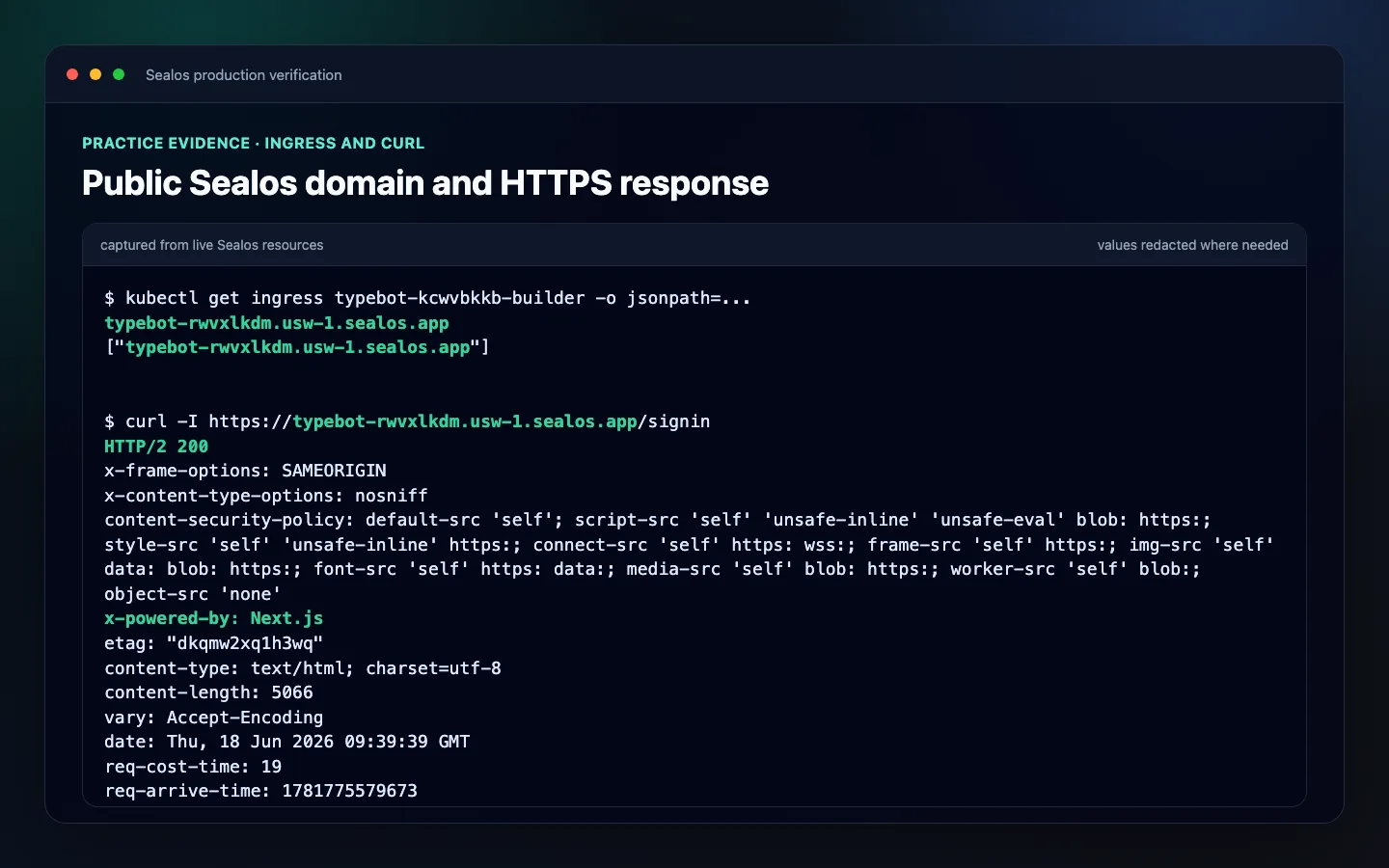 Sealos ingress host and HTTPS response for the practiced Next.js deployment
7. Scaling checklist
Next.js apps can run multiple instances only if state is shared correctly.
Production checklist:
- The app is safe to run with more than one instance
- Sessions are stored in PostgreSQL, Redis, or another shared store
- Uploaded files are not stored on one container instance
- Background jobs do not run duplicated unsafe work on every instance
- Cache invalidation works across instances
- Autoscaling min and max values are set intentionally
- CPU and memory limits match real traffic expectations
- Load testing or smoke testing confirms the app behaves under traffic
- Migrations do not run concurrently from every replica in an unsafe way
If the app is not horizontally safe yet, start with one instance and document why.
See: Sealos Scaling
8. Monitoring and logs checklist
You need to know when production is broken before users tell you.
Runtime Truth Pass is the launch gate for production. Treat homepage load as one signal inside acceptance, then prove the real runtime with app-specific checks before calling the release ready.
Production checklist:
- App logs are visible in Sealos
- Build and deploy logs are retained
- Server errors are reported to an error tracking tool
/api/healthor equivalent returns app and database status; add it if the starter template does not include one- The actual App URL opens from a fresh session
- Custom domain and HTTPS work when the release uses a production domain
- Public URL uptime is monitored
- Health endpoint behavior matches the app contract and returns a non-5xx response
- Logs after smoke are checked for startup, migration, database, SSR, browser, and access-control failures
- Resource footprint matches the intended Instance, App, Deployment, Service, Ingress, Jobs, KubeBlocks resources, PVCs, and Pods
- Login-gated apps complete setup/login and at least one authenticated page or authenticated API request
- Database-backed apps show database and migration evidence plus application-level read/write behavior
- Database connection errors are easy to identify
- Slow requests are measurable
- The team knows where to look first during an incident
A simple health endpoint can start like this. This is a recommended addition, not something every Next.js template already provides:
For database-backed apps, include a lightweight database check, but keep it cheap. A health endpoint should not become a source of load.
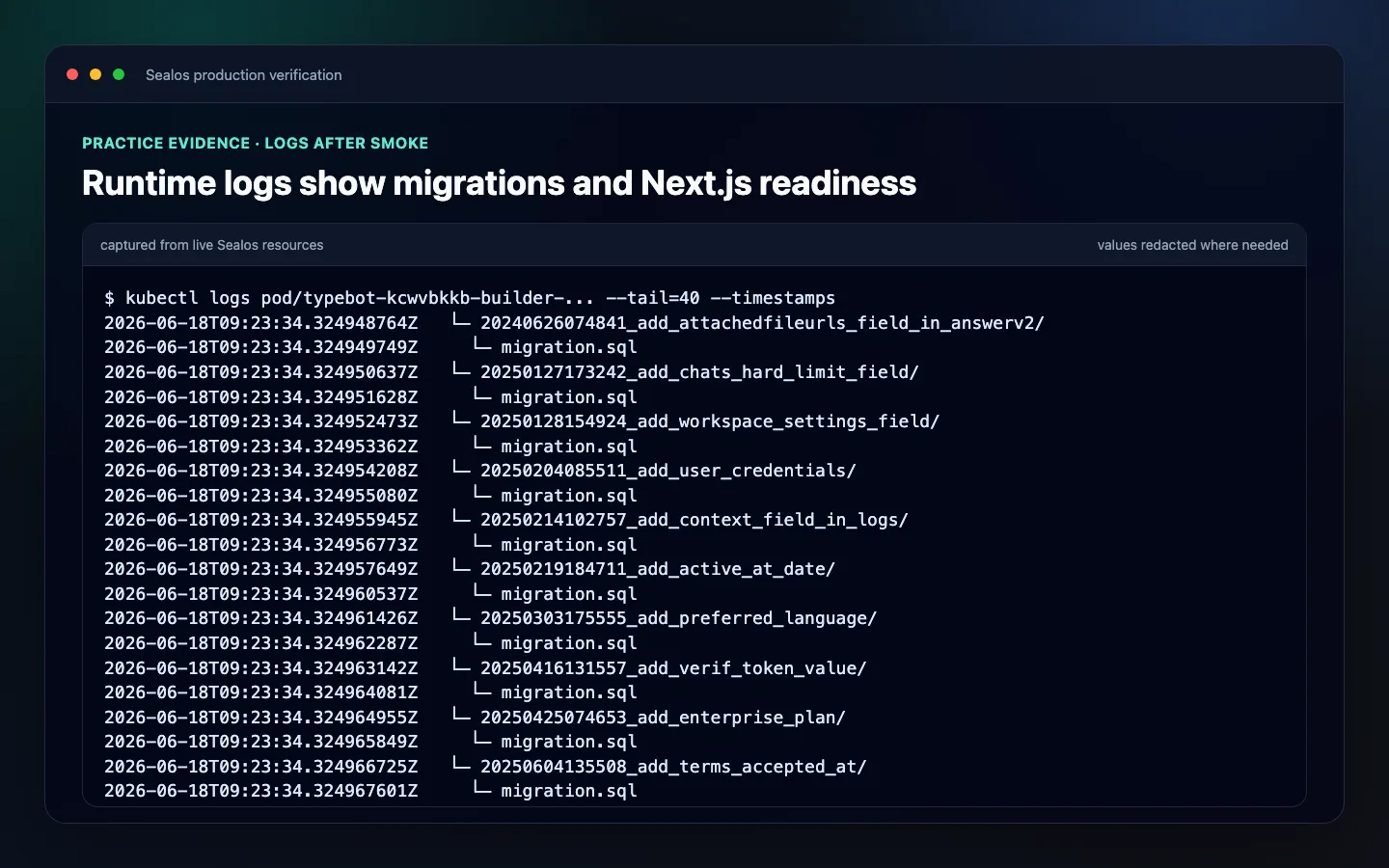 Sealos runtime logs showing migrations applied and Next.js ready
9. Backup checklist
Backups are part of production, not an afterthought.
Production checklist:
- PostgreSQL backup policy is known
- Restore procedure is tested or documented
- Persistent volume backup plan exists if file storage is used
- Object storage bucket lifecycle is understood if uploads are stored there
- Before major releases, database and storage recovery points are created where available
- Backup ownership is clear
- The team knows who can restore data and how long it takes
For database-backed Next.js apps, the riskiest deployment is usually not the code rollout. It is the schema change.
Before schema-changing releases:
- Confirm migration direction
- Confirm rollback direction
- Back up the database
- Keep the previous image tag available
- Record the deployed image before updating
- Decide what happens to user data written after the release
10. Update and rollback checklist
The Sealos deploy skill supports a day-2 update path.
When .sealos/state.json contains a valid previous deployment, the skill can detect the running app and offer to update it instead of creating a new one. The state file is only the starting point: the Kubernetes Deployment named in last_deploy.app_name must still exist in the recorded namespace, or the update path should fall back to a new deploy or state repair.
Production update flow:
Production checklist:
- Previous image tag is known
- New image tag is unique, not
latest .sealos/state.jsonhas a validlast_deploy- The recorded Kubernetes Deployment still exists in the recorded namespace
- Fresh deploy, cluster discovery, or state repair is selected when state is missing, stale, broken, or unverifiable
- New image is built or an approved linux/amd64 image is reused
- Rollout verification is required
- Failed rollout triggers rollback to the previous image
- Private GHCR pull Secret is refreshed before swapping to a new private image
.sealos/state.jsonreceives a bounded append-onlyhistoryentry after runtime acceptance- Database migrations are reviewed separately from image rollback
- Operators know when to rollback app code, database state, or both
- The rollback runbook has an owner and a time limit
About Atomic Rollback
Atomic Rollback means restoring application code and durable data to a coordinated known-good state.
Treat it as a production readiness target:
- Take pre-release snapshots where available
- Keep the previous image available
- Know whether a release includes schema changes
- Decide how to rescue user data written after the release
- Do not assume image rollback alone is enough for schema-changing deployments
If Atomic Rollback is available in your Sealos environment, validate it before relying on it for production. If it is not available, document the manual rollback path.
See: Sealos Update and Redeploy
11. Security checklist
Production checklist:
- Secrets are not committed
- Browser-exposed variables are limited to intentional
NEXT_PUBLIC_*values - Container runs as a non-root user where possible
- Dependencies are updated before launch
- Admin routes require authentication
- Preview or debug routes are disabled
- CORS settings are intentional
- OAuth redirect URLs are locked to production domains
- Webhooks validate signatures
- Public database access is disabled unless explicitly required
- Logs do not print tokens, passwords, or full connection strings
.sealos/artifacts do not contain plaintext secrets before you commit them
If your app handles payments, personal data, or enterprise accounts, add a separate security review before launch.
12. Final launch runbook
Before switching traffic, write a short runbook.
Use this template:
This does not need to be long. It needs to be accurate under pressure.
Common production failures and fixes
1. Sealos auth or workspace preflight fails
The deploy flow cannot create or inspect production resources without the right Sealos login state, selected workspace, and resource permissions.
Fix:
- Confirm the Sealos account is logged in for the current host
- Select the intended workspace before deploy or update
- Confirm the workspace can create App, database, Service, Ingress, Secret, Job, and PVC resources required by the template
- Re-run the Sealos plugin preflight before changing template files
2. Custom domain opens, but HTTPS fails
Check:
- DNS
CNAMEtarget - Domain propagation
- Sealos custom domain settings
- Certificate status
See: Custom Domain and TLS Issues
3. App works on Sealos URL but auth fails on custom domain
Auth providers still point to the old URL.
Fix:
- Update OAuth callback URLs
- Update
NEXT_PUBLIC_APP_URL - Update
NEXTAUTH_URL,AUTH_URL, or the auth base URL your app uses - Redeploy after env var changes
4. Database connection env var is missing or wrong
The app may read POSTGRES_URL, DATABASE_URL, or another project-specific key, but the deployment wired a different name.
Fix:
- Search source code for
process.env.*database keys - Confirm the same key appears in the Sealos app environment
- Confirm the value is generated from the Sealos PostgreSQL resource
- Redeploy with the corrected env mapping
5. Rollback fixes code but database stays broken
The release included a schema migration.
Fix:
- Restore database backup if needed
- Use backward-compatible migrations when possible
- Avoid destructive schema changes without a recovery plan
- Record whether user data written after release must be rescued
6. Autoscaling creates inconsistent user sessions
Sessions are stored in memory or local files.
Fix:
- Move sessions to PostgreSQL, Redis, or another shared store
- Keep one instance until the session layer is fixed
7. File uploads disappear after redeploy
The app wrote files inside the container filesystem.
Fix:
- Move uploads to object storage
- Or attach persistent storage to the exact upload path
8. The deploy cannot build or push an image
The repo has no reusable linux/amd64 image and the local environment cannot build one.
Fix:
- Install and start Docker
- Confirm
docker buildxworks - Authenticate GHCR through GitHub CLI or configure Docker Hub
- Confirm GHCR package scopes and push permissions
- Rerun the Sealos deploy flow
9. Private image pull Secret fails during rollout
The image was pushed, but the production Deployment cannot pull it.
Fix:
- Confirm the GHCR package is visible to the deployment credentials
- Confirm the generated image pull Secret exists in the recorded namespace
- Refresh the app-scoped image pull Secret before UPDATE swaps to a new private image
- Check pod events with
kubectlor ask the Sealos plugin to inspect rollout readiness
10. Template API validation fails
The generated template has missing or invalid resource fields.
Fix:
- Inspect
.sealos/template/index.yaml - Confirm required env-var values are filled
- Confirm image references, resource names, Service, Ingress, database wiring, and image pull Secret references
- Ask the Sealos plugin to regenerate or validate the template before deployment
11. Rollout readiness or runtime logs fail
The Template API or kubectl accepted the resources, but the app is not ready.
Fix:
- Inspect Deployment availability, pods, initContainers, Jobs, Services, Ingresses, KubeBlocks resources, PVCs, and events
- Check runtime log failures after smoke tests
- Look for startup, migration, database connection, access-control, SSR, browser runtime, and crash-loop errors
- Roll back to the previous image when rollout verification fails
12. .sealos/state.json is stale or broken
The recorded deployment state disagrees with the live cluster.
Fix:
- Confirm
last_deploypoints to a live Kubernetes Deployment in the recorded namespace - Use cluster discovery to find the real running app when it still exists
- Repair
.sealos/state.jsononly from verified live cluster data - Use fresh deploy when state repair cannot prove the deployment identity
Final production checklist
Use this before launch:
- Build passes from a clean checkout
- Sealos deployment reaches
running .sealos/analysis.jsonmatches the current app.sealos/template/index.yamlmatches the intended resources.sealos/state.jsonrecords the accepted current deployment withlast_deployand boundedhistory- DEPLOY or UPDATE mode was selected from valid state plus live cluster verification
- Runtime Truth Pass passed as the launch gate
- Actual App URL works
- Custom domain works
- HTTPS works
- Environment variables are production values
- The app’s actual database connection env var is present if PostgreSQL is used
- Secrets are not committed
- Database migrations are applied or intentionally not needed
- Database objects and application read/write behavior are verified if PostgreSQL is used
- Database backup path is known
- Backup or restore path is known for schema-changing releases
- Persistent storage is configured if needed
- Health endpoint works
- Setup/login and authenticated page or API path work if the app is login-gated
- Logs after smoke are visible and clean
- Resource footprint matches expected Sealos resources
- Error monitoring is configured
- Scaling policy is intentional
- Previous image tag is available
- Private GHCR image pull Secret is current when a private image is used
- Rollout verification passed
- Rollback path is documented
- Launch runbook exists
If every item is true, your Next.js production deployment on Sealos is ready for real users.
Next steps
- First deploy guide: How to Deploy a Next.js App to Sealos in 5 Minutes
- Database guide: Next.js + PostgreSQL Full-Stack Deployment Guide on Sealos
- Sealos docs: Environment Variables
- Sealos docs: Domains and Public Access
- Sealos docs: Persistent Storage
- Sealos docs: Scaling
- Sealos docs: Update and Redeploy
- Sealos docs: Troubleshooting
FAQ
Keep building
Continue this Sealos path
 Sealos
Unify Your Entire Workflow.
Code in a ready-to-use cloud environment, deploy with a click. Sealos combines the entire dev-to-prod lifecycle into one seamless platform. No more context switching.


Explore with AI
Get AI insights on this article