App Store template
Kanboard icon

Kanboard

Organize tasks with Kanboard boards, swimlanes, and work-in-progress limits. Deploy on Sealos with PostgreSQL and persistent storage for data and plugins.

Launch in your Sealos workspace.
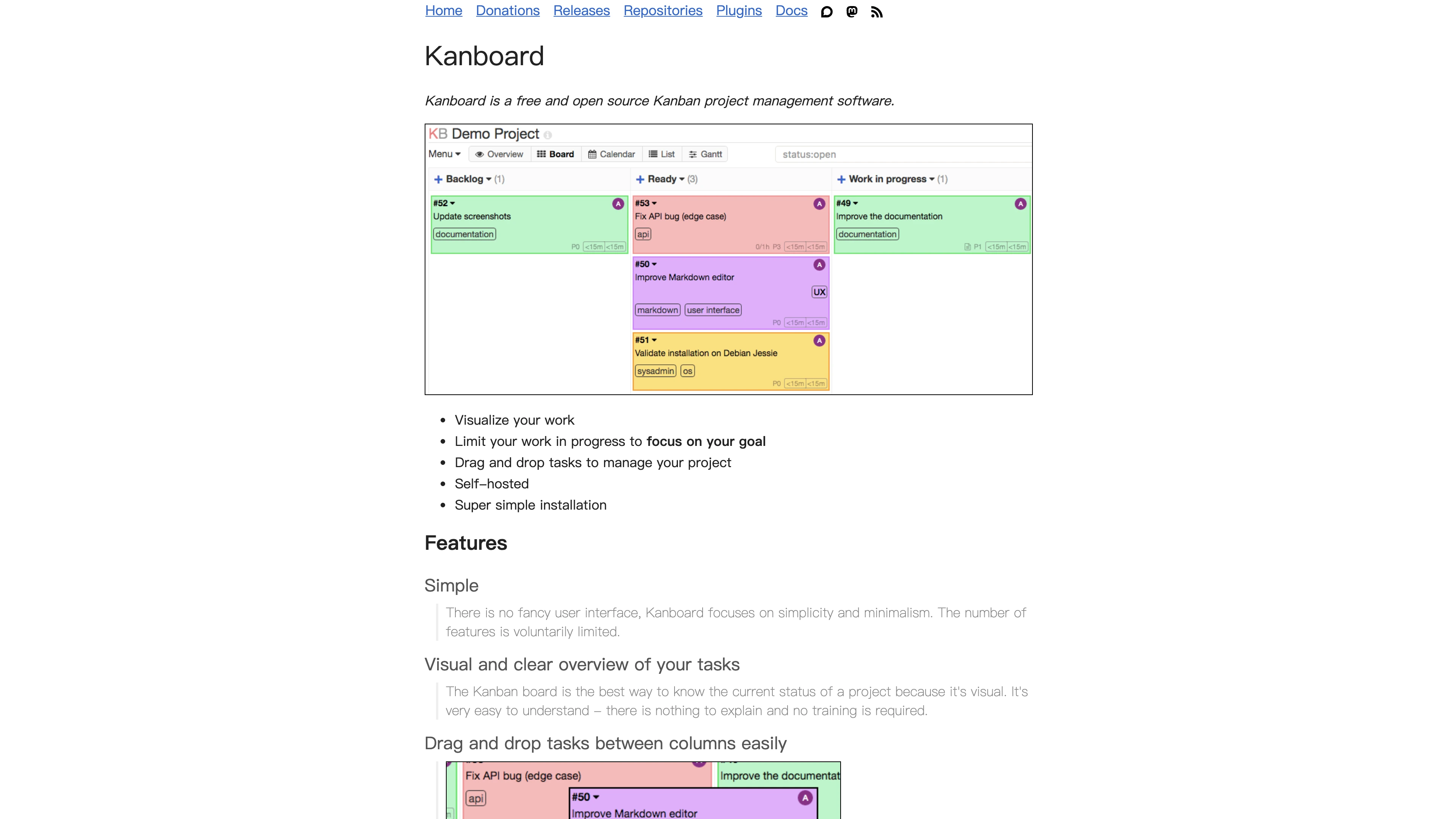
Kanboard template preview
Template previewFull screenshot
Template deployments
15 on Sealos
Deployment
Your own instance
Category
Tools

About this template

Overview

Organize tasks with Kanboard boards, swimlanes, and work-in-progress limits. Deploy on Sealos with PostgreSQL and persistent storage for data and plugins.

From the documentation

Kanboard helps teams organize work with boards, swimlanes, task limits, due dates, and automation rules. It is designed to stay simple and efficient while still supporting practical project workflows.

How to deploy Kanboard

  1. Choose Deploy now to start Kanboard in your Sealos workspace.
  2. Sign in to Sealos and review the template configuration in your workspace.
  3. Launch the template, then inspect the application status and resource cards in Canvas.

Resources to plan for

Start with the resources defined by the Kanboard template. Review CPU, memory, persistent storage, and network allocations for every service in Canvas. Capacity needs depend on your data and workload; monitor usage as they grow.

Template configuration and setup

Access after deployment

Use the application URL or connection details shown in Canvas. Follow the deployment guide for first-time account setup or client configuration, and keep generated credentials available for that step.

Hosting and billing

Sealos monthly plans include compute, memory, storage, and traffic. Size your plan for all deployed services. Software licenses and external AI or API services may have separate terms and charges. Confirm the applicable plan and optional charges in Cost Center.

Compare Sealos resource plans
Read full documentationCollapse documentation

For current cloud charges, refer to Sealos plan pricing. Upstream documentation may reference earlier billing models.

Deploy and Host Kanboard on Sealos

Kanboard is a lightweight, open source Kanban project management tool. This template deploys Kanboard with a managed PostgreSQL backend on Sealos Cloud.

About Hosting Kanboard

Kanboard helps teams organize work with boards, swimlanes, task limits, due dates, and automation rules. It is designed to stay simple and efficient while still supporting practical project workflows.

This Sealos template deploys a production-ready Kanboard service plus a Kubeblocks-managed PostgreSQL cluster. It includes persistent storage for application data and plugin files, automatic public access through Sealos Ingress, and platform-managed TLS at the gateway layer.

Common Use Cases

  • Team Task Boards: Manage day-to-day engineering, product, and operations tasks with visual Kanban workflows.
  • Sprint Planning: Organize sprint backlogs, define WIP limits, and track progress by column.
  • IT and DevOps Tracking: Track incidents, maintenance tasks, and infrastructure work items.
  • Client Project Management: Separate customer projects into boards and monitor deadlines clearly.
  • Personal Productivity: Use a private Kanban board for personal planning and execution.

Dependencies for Kanboard Hosting

The Sealos template includes all required dependencies: Kanboard runtime, PostgreSQL database resources, persistent volumes, service discovery, and ingress exposure.

Deployment Dependencies
Implementation Details

Architecture Components:

This template deploys the following services:

  • Kanboard StatefulSet: Main application service running kanboard/kanboard:v1.2.50
  • PostgreSQL Cluster: Kubeblocks-managed PostgreSQL postgresql-16.4.0 for persistent relational data
  • Service + Ingress: Internal service on port 80 and public ingress with TLS domain routing
  • Persistent Storage: PVC-backed data path mounted at /var/www/app/data

Configuration:

  • Database connection values are injected from Kubeblocks generated secrets.
  • PLUGINS_DIR is set to /var/www/app/data/plugins to isolate plugin scanning from filesystem root artifacts.
  • Ingress terminates TLS at the Sealos gateway and routes HTTP traffic to the Kanboard service.

License Information:

Kanboard is licensed under the MIT License.

Why Deploy Kanboard on Sealos?

Sealos is an AI-assisted Cloud Operating System built on Kubernetes that unifies the application lifecycle from development to production operations. By deploying Kanboard on Sealos, you get:

  • One-Click Deployment: Launch Kanboard and its database stack without manual Kubernetes setup.
  • Managed Database Experience: Use Kubeblocks PostgreSQL resources with standardized secret and service wiring.
  • Easy Customization: Update resources and environment settings from Canvas dialogs.
  • Zero Kubernetes Expertise Required: Get Kubernetes reliability without writing infrastructure YAML manually.
  • Persistent Storage Included: Keep board and task data safe across pod restarts.
  • Instant Public Access: Receive a public domain with TLS enabled by platform ingress.
  • AI-Assisted Operations: Use the Canvas AI dialog for post-deployment updates and routine adjustments.

Deploy Kanboard on Sealos and focus on project delivery instead of platform management.

Deployment Guide

  1. Open the Kanboard template and click Deploy Now.
  2. Configure the deployment parameters in the popup dialog.
  3. Wait for deployment to complete (typically 2-3 minutes). After deployment, you will be redirected to Canvas.
  4. Open the generated Kanboard URL from the app card.
  5. Sign in and immediately update the default admin credentials according to your security policy.

Configuration

After deployment, configure Kanboard through:

  • AI Dialog in Canvas: Describe desired changes and let AI apply updates.
  • Resource Cards: Open StatefulSet, Service, Ingress, or database cards to adjust settings.
  • Kanboard Admin Settings: Configure application behavior from the Kanboard web interface.

Scaling

To scale Kanboard resources:

  1. Open the deployment in Canvas.
  2. Click the Kanboard StatefulSet resource card.
  3. Adjust CPU and memory limits/requests.
  4. Apply updates and monitor rollout status.

For most Kanboard installations, keep a single application replica and scale vertically first.

Troubleshooting

Common Issues

Issue: Application page does not load

  • Cause: Ingress or service endpoint is not ready yet.
  • Solution: Check pod readiness, service status, and ingress rules in Canvas.

Issue: Database connection errors

  • Cause: PostgreSQL cluster is still initializing or secret wiring is incomplete.
  • Solution: Verify PostgreSQL pod health and confirm DB_* environment variables reference the expected secret keys.

Issue: Plugin loading errors

  • Cause: Plugin directory contents are invalid or incompatible.
  • Solution: Verify PLUGINS_DIR=/var/www/app/data/plugins and review application logs for specific plugin names.
Getting Help

Additional Resources

License

Kanboard is licensed under the MIT License.
This Sealos template is distributed under the license terms of the templates repository.

From launch to everyday operations

Why deploy
on Sealos

A shorter path from an app you want to an app you can run. Sealos brings deployment and ongoing operations into one place.

  1. One-click deployment

    Start with a ready-made template. Review its configuration and launch from the Sealos console.

  2. Managed Kubernetes

    Run on managed infrastructure with built-in workload scheduling and recovery.

  3. Automatic HTTPS

    Give your application a public HTTPS endpoint with certificates managed for you.

  4. Persistent storage

    Keep application data on persistent volumes across container restarts.

  5. Room to grow

    Adjust CPU, memory, and replicas from the console as your workload changes.

One template. Connected resources.

You Get the Whole Stack

Sealos provisions the resources defined by your template and brings them together in your workspace.

  • App Service

    Container workloads with configurable CPU, memory, and replicas.

  • Public HTTPS URL

    An address for your app, with managed TLS certificates.

  • Database

    A database provisioned alongside your app when the template calls for one.

  • Persistent Volume

    Storage for the files and data your application needs to keep.

  • Environment Variables

    Application settings and secrets configured in one place.

  • Logs & Metrics

    Inspect container logs and resource usage from the console.

Resources and their configuration vary by template. Review the deployment form for this app’s exact setup.

Explore more production-ready templates.

More