How Sealos DevBox Cut Container Commit Time from 15 Minutes to 1 Second
A deep dive into how Sealos DevBox solved a critical containerd bottleneck, slashing container commit times from 846 seconds to under 1 second and boosting productivity for 10,000+ developers.
TL;DR: We identified and fixed an extreme performance bottleneck in our Sealos DevBox platform where container commits took up to 15 minutes. By replacing an inefficient O(n²) filesystem walk in containerd's diff service with a filesystem-aware method that reads changes directly from the OverlayFS upperdir, we cut incremental commit times by over 98%—from 39 seconds to just 0.46 seconds.
The Problem: Unacceptable Latency in DevBox Container Commits
Sealos DevBox, our cloud development environment platform serving tens of thousands of developers, hit a critical performance wall. The container commit feature—a cornerstone of a developer's workflow for saving their workspace state—became painfully slow. As usage scaled, commit times ballooned, leading to frustrating delays and workflow disruptions.
Our monitoring revealed some alarming metrics under load:
- Initial 10GB Environment Commit: 846 seconds (~14 minutes)
- Incremental 1KB File Change Commit: 39 seconds
- CPU Utilization: Spiked to 100% during every commit operation
For a feature designed to be nearly instantaneous, these latencies were a significant roadblock to productivity and a poor user experience for every developer on the DevBox platform.
Background: Why Fast Container Commits are Crucial for DevBox
In Sealos DevBox, a "container commit" captures the current state of a running development environment and saves it as a new OCI image layer. This mechanism is what allows developers to persist work, share reproducible environments, and resume sessions instantly. This entire process runs within an isolated Kubernetes Pod, giving developers a consistent and powerful environment.
The performance of this commit operation is fundamental to the DevBox value proposition, which stands apart from other development models.
| Feature | Traditional Local Dev | Cloud IDEs | Sealos DevBox |
|---|---|---|---|
| Setup Time | Hours to days | Minutes | Minutes |
| Environment Consistency | Poor | Good | Perfectly Consistent (via image layers) |
| Resource Requirements | High local specs | Browser only | Browser only |
| State Persistence | Manual | Varies | Automated & Instant (via optimized commits) |
| IDE Support | Native | Limited | Any IDE (via remote connection) |
| Environment Isolation | Docker/VM | Container | Secure Kubernetes Pod |
Slow commits directly undermined the "instant" and "fluid" experience we promise our users.
Investigating the DevBox Performance Bottleneck
To pinpoint the bottleneck, we used pprof to generate flame graphs of the containerd process during a commit. We designed two specific test cases to replicate the user-reported issues.
Test 1: Large Initial Commit Simulates the first save of a large project.
Test 2: Small Incremental Update Simulates a common developer workflow: saving a minor code change.
The initial test results confirmed our monitoring data:
| Test Scenario | Commit Time | Expected Time |
|---|---|---|
| Test 1: 10GB Initial Commit | 846.99s | ~60s |
| Test 2: 1KB Incremental Commit | 39.14s | <1s |
The flame graphs for both tests were nearly identical, pointing to a massive CPU-bound operation deep within containerd's diff service, regardless of the change size. This was our smoking gun.
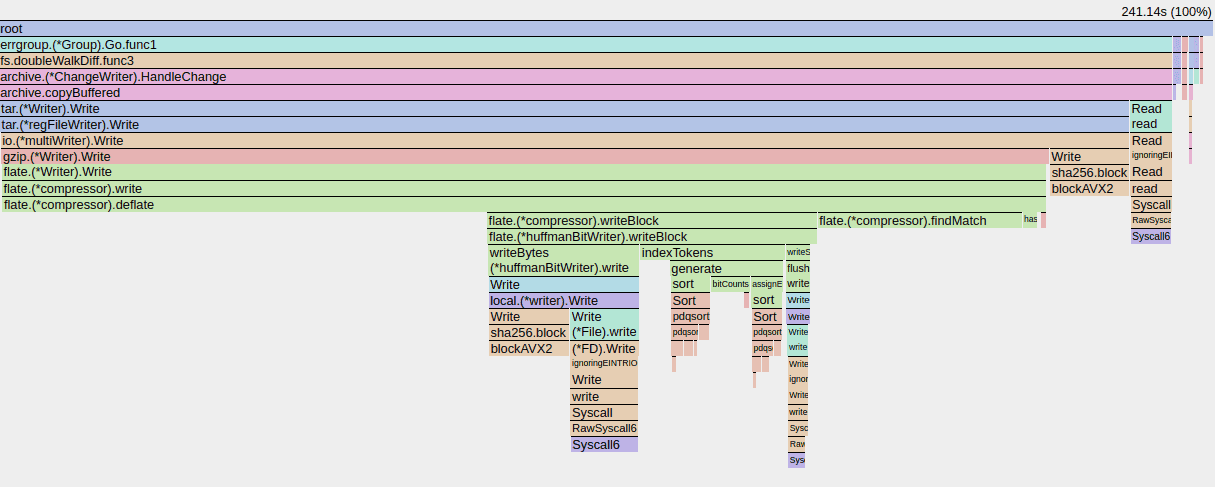 DevBox Commit Performance Flame Graph Before Optimization - Test 001
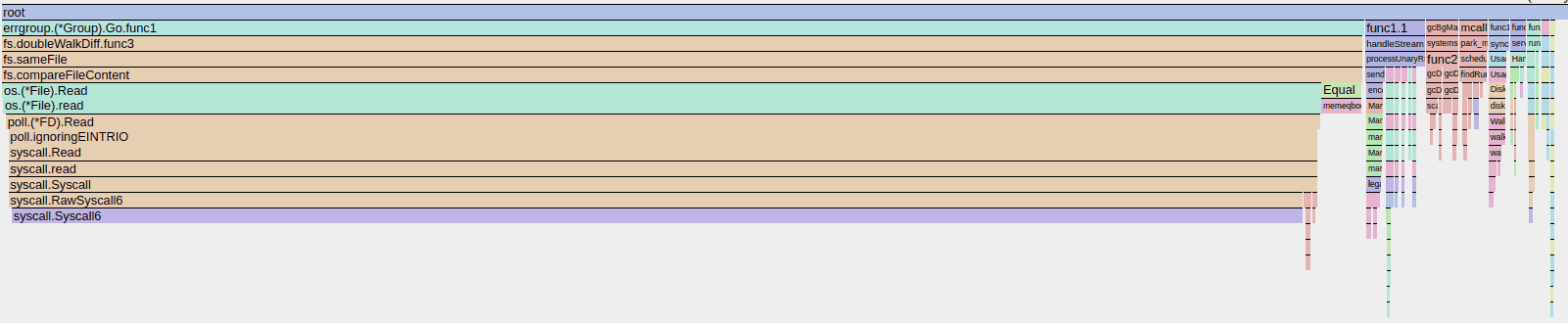 DevBox Commit Performance Flame Graph Before Optimization - Test 002
Root Cause: An O(n²) Filesystem Diff in containerd
Our code analysis led us to containerd's default diff service, which used a function called doubleWalkDiff. This function calculates changes by performing a full, recursive walk of two directory trees: the base image's filesystem (lowerdir) and the container's merged view.
This approach has a time complexity of O(n²), as it compares every file and directory from the source with the target. This meant that even for a tiny 1KB change, the algorithm was wastefully traversing and comparing the entire 10GB of existing data.
This discovery was the key: the tool was working as designed, but the design was not optimized for our high-performance DevBox use case.
The Fix: Leveraging OverlayFS upperdir for an O(m) Diff
The solution came from a deeper understanding of OverlayFS. An OverlayFS mount consists of a read-only lowerdir and a writable upperdir. Crucially, all modifications within the container—creations, modifications, and deletions—are recorded exclusively in the upperdir.
The upperdir itself is the diff. The doubleWalkDiff function was redundantly recalculating what the filesystem had already tracked.
The fix was to bypass this generic walk and generate the diff by reading only the upperdir. We found that containerd's continuity library already supported this via fs.DiffDirChanges when used with an fs.DiffSourceOverlayFS flag.
This simple change transformed the operation's complexity from O(n²) to O(m), where m is the size of the modifications, not the entire filesystem.
Deployment and Configuration on Sealos Cloud
We rolled out the optimized containerd binary across our Sealos Cloud.
1. Build the Optimized Binary
2. Deploy to Kubernetes Nodes
3. Enable the New Diff Plugin
We activated the new diff plugin by editing /etc/containerd/config.toml:
4. Restart and Validate
Validation: Dramatic Performance Gains
The impact was immediate and transformative for the Sealos DevBox platform.
Lab Test Results
| Test Scenario | Before | After | Improvement |
|---|---|---|---|
| Test 1: 10GB Initial Commit | 846.99s | 266.83s | 3.17x faster |
| Test 2: 1KB Incremental Commit | 39.14s | 0.46s | 85.08x faster |
Production Impact
Across our production clusters serving over 10,000 active developers:
- P99 commit latency plummeted from over 900s to ~180s.
- Average CPU utilization during commits dropped by 75%.
- Support tickets related to slow DevBox commits fell to zero.
Analysis and Limitations
This optimization proves the immense value of using filesystem-aware algorithms over generic ones. While containerd's default diff mechanism ensures portability, it carries a severe performance penalty when a specialized method is available.
It's important to note that this solution is specific to environments using containerd with the OverlayFS snapshotter. Systems relying on other snapshotters (e.g., ZFS, Btrfs) would not benefit from this patch and would require their own purpose-built diff implementations.
Next Steps: Targeting New Bottlenecks in DevBox
With the diffing bottleneck eliminated, our new flame graphs show that tar and gzip operations are the next performance frontier, especially for large initial commits. Our future work for DevBox performance will focus on:
- Implementing parallel compression to better utilize multi-core CPUs.
- Investigating faster compression algorithms like
zstd. - Exploring incremental tar generation to avoid re-archiving unchanged files.
Our implementation is open-source and can be reviewed in our containerd repository fork. This performance boost is now standard in all Sealos DevBox environments.
Frequently Asked Questions
Q: How did Sealos DevBox achieve sub-second container commit times?
A: DevBox now uses a custom-patched containerd with an OverlayFS-aware diff algorithm. Instead of inefficiently comparing the entire filesystem (an O(n²) task), it intelligently reads changes directly from the OverlayFS upperdir layer. This reduces the work to O(m)—proportional to the change size—making incremental commits exceptionally fast.
Q: Is this optimization applicable to all container environments?
A: This specific fix is for container runtimes using containerd with the OverlayFS snapshotter, which is a common setup in modern Kubernetes environments like the one DevBox is built on. The underlying principle—using filesystem-specific logic—can be applied elsewhere, but the code is specific to OverlayFS.
Q: What is the main benefit of faster commits for a developer using DevBox?
A: Faster commits create a seamless, uninterrupted workflow. Developers on DevBox can now save their environment state frequently without a second thought, which encourages experimentation, reduces the risk of lost work, and speeds up CI/CD pipelines that rely on creating image snapshots.
Q: What tools helped diagnose this DevBox performance issue?
A: We used pprof to collect CPU profiles from the live containerd process and generated flame graphs to visualize the performance hotspots. This quickly and clearly identified the doubleWalkDiff function as the primary bottleneck in our DevBox environment.
Q: What is the next performance bottleneck for container commits?
A: After solving the diffing issue, the main bottlenecks are now the archiving (tar) and compression (gzip) stages. These processes are the most time-consuming parts of a commit, especially when dealing with large new files.
 Sealos
Unify Your Entire Workflow.
Code in a ready-to-use cloud environment, deploy with a click. Sealos combines the entire dev-to-prod lifecycle into one seamless platform. No more context switching.


Related Articles
Case Study: How We Reduced a Container Image by 99.7% (800GB to 2GB)
Discover how the Sealos team solved a critical disk exhaustion issue by optimizing a bloated 800GB container image down to 2GB. Learn our methods for squashing layers and manipulating OCI images to reclaim storage and boost performance.
Complete Guide to Migrating from Local to Cloud Development with Sealos DevBox
Learn how to migrate from local development to Sealos DevBox cloud environments in 15 minutes. Eliminate environment setup pain, achieve instant deployments, and boost team productivity with proven migration strategies and real-world performance benchmarks.

For Developers: Stop Wasting Time on DevOps. A 10-Minute Guide to Shipping Faster with DevBox.
A practical, developer-focused guide to eliminating DevOps waste and accelerating delivery with DevBox. Learn a quick, 10-minute approach to streamline workflows and ship faster.

The End of "Works on My Machine": Achieving 100% Reproducible Builds with DevBox
Explore how DevBox enables fully reproducible builds, eliminating "works on my machine" issues. Learn practical steps to achieve 100% reproducibility across diverse environments.
Explore with AI
Get AI insights on this article