DJANGO DEPLOYMENT GUIDE

How to Deploy a Django App on Sealos

Build and deploy a Django 5.2 Task app with PostgreSQL on Sealos. Verify a working create/read flow over HTTPS.

Python 3.12-3.14 with Django 5.2 LTS35 minutesBeginner guideUpdated Sep 2, 2026

What you will deploy

You will build a Django Task app that saves tasks to SQLite locally, prepare it for Gunicorn and PostgreSQL, and deploy it with Sealos Skills. You will finish with a public page, a WhiteNoise-served CSS asset, and a Task created and read through the live application.

RequirementVersion used by this guide
Python3.12-3.14
Django>=5.2,<5.3
uv0.10 or newer
Dependency lockuv.lock

Prerequisites:

  • Python 3.12, 3.13, or 3.14 available to uv
  • uv 0.10+
  • Git
  • A Sealos Cloud account and target workspace
  • Local Codex with access to the project directory

Already have a Django project that works locally? Jump to Prepare Django for production. Keep your current dependency manifest and lock, reviewed WSGI or ASGI production server and entry point, and STORAGES['default']. Replace config in commands with your project package, merge the WhiteNoise staticfiles storage alias into your settings, and use an equivalent create/read flow from your application.

Create a Django Task app

Create the project from an empty directory

Working directory: The parent directory that will contain the project.

mkdir django-sealos-tasks
cd django-sealos-tasks
git init
uv init --bare --name django-sealos-tasks --python '>=3.12,<3.15'
uv add 'Django>=5.2,<5.3'
uv run django-admin startproject config .
uv run python manage.py startapp tasks

The Python and Django ranges keep the project on Django 5.2 LTS while allowing maintained Python releases supported by this guide. uv add writes both pyproject.toml and uv.lock.

Expected: the repository root contains manage.py, pyproject.toml, uv.lock, config/, and tasks/.

Register the Task app

File: config/settings.py

Add tasks.apps.TasksConfig as the first item in the generated INSTALLED_APPS list:

INSTALLED_APPS = [
    'tasks.apps.TasksConfig',
    'django.contrib.admin',
    'django.contrib.auth',
    'django.contrib.contenttypes',
    'django.contrib.sessions',
    'django.contrib.messages',
    'django.contrib.staticfiles',
]

This lets Django discover the Task model and its migrations.

Check it from the repository root:

uv run python manage.py check

Expected:

System check identified no issues (0 silenced).

Create the Task model

File: tasks/models.py

Replace the generated file with:

from django.db import models
 
 
class Task(models.Model):
    title = models.CharField(max_length=200)
    created_at = models.DateTimeField(auto_now_add=True)
 
    def __str__(self) -> str:
        return self.title

The model gives local and production verification the same database-backed record.

Create the form

File: tasks/forms.py

Create the file with:

from django import forms
 
from .models import Task
 
 
class TaskForm(forms.ModelForm):
    class Meta:
        model = Task
        fields = ['title']
        widgets = {
            'title': forms.TextInput(
                attrs={
                    'autocomplete': 'off',
                    'placeholder': 'Ship Django on Sealos',
                }
            )
        }

ModelForm validates the title against the model before saving it.

Add the create/list view

File: tasks/views.py

Replace the generated file with:

from django.shortcuts import redirect, render
 
from .forms import TaskForm
from .models import Task
 
 
def task_list(request):
    if request.method == 'POST':
        form = TaskForm(request.POST)
        if form.is_valid():
            form.save()
            return redirect('tasks:list')
    else:
        form = TaskForm()
 
    tasks = Task.objects.order_by('-created_at')
    return render(
        request,
        'tasks/task_list.html',
        {'form': form, 'tasks': tasks},
    )

The redirect after a valid POST prevents a browser refresh from submitting the same Task twice.

Route the application

File: tasks/urls.py

Create the file with:

from django.urls import path
 
from .views import task_list
 
app_name = 'tasks'
 
urlpatterns = [
    path('', task_list, name='list'),
]

File: config/urls.py

Replace the generated file with:

from django.urls import include, path
 
urlpatterns = [
    path('', include('tasks.urls')),
]

The project now serves the Task create/list flow at /.

Add the HTML page

File: tasks/templates/tasks/task_list.html

Create the directories from the repository root:

mkdir -p tasks/templates/tasks

Then create the file with this complete template:

{% load static %}
<!doctype html>
<html lang="en">
  <head>
    <meta charset="utf-8">
    <meta name="viewport" content="width=device-width, initial-scale=1">
    <title>Django tasks</title>
    <link rel="stylesheet" href="{% static 'tasks/app.css' %}">
  </head>
  <body>
    <main>
      <p class="eyebrow">Django + Sealos</p>
      <h1>Django tasks</h1>
      <p>Create a task, then read it from the list below.</p>
 
      <form method="post">
        {% csrf_token %}
        {{ form.title.label_tag }}
        {{ form.title }}
        {{ form.title.errors }}
        <button type="submit">Add task</button>
      </form>
 
      <section>
        <h2>Task list</h2>
        <ul>
          {% for task in tasks %}
            <li data-task-id="{{ task.pk }}">{{ task.title }}</li>
          {% empty %}
            <li class="empty">No tasks yet.</li>
          {% endfor %}
        </ul>
      </section>
    </main>
  </body>
</html>

The {% csrf_token %} tag protects the POST request, and the list reads Tasks through the view's database query.

Add the CSS asset

File: tasks/static/tasks/app.css

Create the directories from the repository root:

mkdir -p tasks/static/tasks

Then create the file with:

:root {
  color: #17213a;
  background: #f4f7fb;
  font-family: system-ui, sans-serif;
}
 
body {
  margin: 0;
}
 
main {
  width: min(42rem, calc(100% - 2rem));
  margin: 4rem auto;
  padding: 2rem;
  border: 1px solid #d9e2f2;
  border-radius: 1rem;
  background: white;
}
 
.eyebrow {
  color: #2563eb;
  font-weight: 700;
  letter-spacing: 0.08em;
  text-transform: uppercase;
}
 
form {
  display: flex;
  gap: 0.75rem;
  margin: 2rem 0;
}
 
input {
  flex: 1;
  padding: 0.75rem;
}
 
button {
  padding: 0.75rem 1rem;
  border: 0;
  border-radius: 0.5rem;
  color: white;
  background: #2563eb;
  cursor: pointer;
}
 
li {
  margin-block: 0.5rem;
}
 
.empty {
  color: #64748b;
}

This file provides a visible static-asset check for both local and production runs.

Create the schema and verify SQLite locally

Working directory: Repository root.

uv run python manage.py makemigrations tasks
uv run python manage.py migrate
uv run python manage.py check
uv run python manage.py runserver

Expected migration and check output includes:

Migrations for 'tasks':
  tasks/migrations/0001_initial.py
    + Create model Task
Applying tasks.0001_initial... OK
System check identified no issues (0 silenced).
Starting development server at http://127.0.0.1:8000/

Open http://127.0.0.1:8000/, enter Ship Django on Sealos, and select Add task. The browser redirects to / and the Task appears under Task list.

Stop the development server, then confirm the value came from SQLite:

uv run python manage.py shell -c "from tasks.models import Task; print(Task.objects.filter(title='Ship Django on Sealos').values_list('title', flat=True).first())"

Expected:

Ship Django on Sealos

The same migration and form flow will run against private PostgreSQL after deployment.

Prepare Django for production

Existing-project readers join here. The sequence follows Django's deployment checklist: declare production dependencies, move configuration into environment variables, collect static files, apply migrations, and start a production server.

Add the production dependencies

Working directory: Repository root.

uv add gunicorn 'psycopg[binary]' 'whitenoise[brotli]' django-environ
uv sync --frozen
uv lock --check

Gunicorn runs Django's WSGI application, psycopg connects Django to PostgreSQL, WhiteNoise serves versioned static assets, and django-environ reads typed settings. uv add updates uv.lock; commit that lock file with the application so every build installs the resolved versions.

Expected: both checks exit with status 0; a silent uv lock --check indicates success.

Create safe environment files

File: .gitignore

Create the file with:

.venv/
__pycache__/
*.py[cod]
db.sqlite3
staticfiles/
.env
.env.*
!.env.example

The local database, collected static output, virtual environment, and local environment files stay outside source control. The committed example documents the production contract.

File: .env.example

DEBUG=False
SECRET_KEY=<generate-and-store-as-a-protected-value>
DATABASE_URL=<provided-by-sealos-private-postgresql>
ALLOWED_HOSTS=<actual-public-host>
CSRF_TRUSTED_ORIGINS=https://<actual-public-host>
SECURE_SSL_REDIRECT=True
PORT=8080

Generate a local secret from the repository root:

uv run python -c "import secrets; print(secrets.token_urlsafe(64))"

Copy the printed value into SECRET_KEY in a new local file:

File: .env

DEBUG=True
SECRET_KEY=<paste-generated-value-here>
ALLOWED_HOSTS=localhost,127.0.0.1
CSRF_TRUSTED_ORIGINS=http://127.0.0.1:8000
SECURE_SSL_REDIRECT=False
PORT=8000

Leave DATABASE_URL unset locally so Django continues to use SQLite. Process environment variables take precedence over .env during deployment.

Check both files:

test -f .env.example && echo '.env.example exists'
git check-ignore -q .env && echo '.env is ignored'

Expected:

.env.example exists
.env is ignored

If you see django.core.exceptions.ImproperlyConfigured: Set the SECRET_KEY environment variable: Generate the secret, replace <paste-generated-value-here> in .env, and run the command again.

Configure Django for local and production environments

File: config/settings.py

For the project created in this guide, replace the file with the complete settings below. In an existing project, merge the environment, database, middleware, static-file, proxy, and security settings while retaining your project-specific applications, template configuration, reviewed WSGI or ASGI entry point, and STORAGES['default']. Add the staticfiles storage alias to the current STORAGES mapping.

from pathlib import Path
 
import environ
 
BASE_DIR = Path(__file__).resolve().parent.parent
 
env = environ.Env()
environ.Env.read_env(BASE_DIR / '.env')
 
SECRET_KEY = env('SECRET_KEY')
DEBUG = env.bool('DEBUG', default=False)
ALLOWED_HOSTS = env.list(
    'ALLOWED_HOSTS', default=['localhost', '127.0.0.1']
)
CSRF_TRUSTED_ORIGINS = env.list('CSRF_TRUSTED_ORIGINS', default=[])
 
INSTALLED_APPS = [
    'tasks.apps.TasksConfig',
    'django.contrib.admin',
    'django.contrib.auth',
    'django.contrib.contenttypes',
    'django.contrib.sessions',
    'django.contrib.messages',
    'django.contrib.staticfiles',
]
 
MIDDLEWARE = [
    'django.middleware.security.SecurityMiddleware',
    'whitenoise.middleware.WhiteNoiseMiddleware',
    'django.contrib.sessions.middleware.SessionMiddleware',
    'django.middleware.common.CommonMiddleware',
    'django.middleware.csrf.CsrfViewMiddleware',
    'django.contrib.auth.middleware.AuthenticationMiddleware',
    'django.contrib.messages.middleware.MessageMiddleware',
    'django.middleware.clickjacking.XFrameOptionsMiddleware',
]
 
ROOT_URLCONF = 'config.urls'
 
TEMPLATES = [
    {
        'BACKEND': 'django.template.backends.django.DjangoTemplates',
        'DIRS': [],
        'APP_DIRS': True,
        'OPTIONS': {
            'context_processors': [
                'django.template.context_processors.request',
                'django.contrib.auth.context_processors.auth',
                'django.contrib.messages.context_processors.messages',
            ],
        },
    },
]
 
WSGI_APPLICATION = 'config.wsgi.application'
 
DATABASES = {
    'default': env.db(
        'DATABASE_URL',
        default=f"sqlite:///{BASE_DIR / 'db.sqlite3'}",
    ),
}
 
AUTH_PASSWORD_VALIDATORS = [
    {
        'NAME': 'django.contrib.auth.password_validation.UserAttributeSimilarityValidator',
    },
    {
        'NAME': 'django.contrib.auth.password_validation.MinimumLengthValidator',
    },
    {
        'NAME': 'django.contrib.auth.password_validation.CommonPasswordValidator',
    },
    {
        'NAME': 'django.contrib.auth.password_validation.NumericPasswordValidator',
    },
]
 
LANGUAGE_CODE = 'en-us'
TIME_ZONE = 'UTC'
USE_I18N = True
USE_TZ = True
 
STATIC_URL = '/static/'
STATIC_ROOT = BASE_DIR / 'staticfiles'
STORAGES = {
    'default': {
        'BACKEND': 'django.core.files.storage.FileSystemStorage',
    },
    'staticfiles': {
        'BACKEND': 'whitenoise.storage.CompressedManifestStaticFilesStorage',
    },
}
 
DEFAULT_AUTO_FIELD = 'django.db.models.BigAutoField'
 
SECURE_PROXY_SSL_HEADER = ('HTTP_X_FORWARDED_PROTO', 'https')
SECURE_SSL_REDIRECT = env.bool('SECURE_SSL_REDIRECT', default=False)
SESSION_COOKIE_SECURE = not DEBUG
CSRF_COOKIE_SECURE = not DEBUG

BASE_DIR exists before .env is loaded. The DATABASE_URL fallback keeps SQLite for local development, while the deployment value selects private PostgreSQL. WhiteNoise's storage backend hashes and compresses collected static files. The proxy header lets Django recognize the original HTTPS request before applying redirects and secure cookies.

Run Django's standard check:

uv run python manage.py check

Expected:

System check identified no issues (0 silenced).

Run Django's deployment checks with safe production-like values:

DEBUG=False \
SECRET_KEY="$(uv run python -c 'import secrets; print(secrets.token_urlsafe(64))')" \
ALLOWED_HOSTS=django.example.com \
CSRF_TRUSTED_ORIGINS=https://django.example.com \
SECURE_SSL_REDIRECT=True \
uv run --frozen --no-dev python manage.py check --deploy --fail-level ERROR

Expected: exit status 0. Django can still report HSTS policy warnings such as security.W004, security.W005, and security.W021. Enable HSTS only after the domain-wide HTTPS policy is ready to enforce for every subdomain.

Optional Sealos Skills help for readers who already have the plugin installed:

$sealos inspect config/settings.py for environment loading, WhiteNoise static delivery, private PostgreSQL through DATABASE_URL, HTTPS proxy handling, and PORT concerns; propose the smallest required diff and wait for my review.

Review the proposed diff before accepting any file change. The primary deployment step remains after the readiness checklist.

Define and test the deployment lifecycle

Use these commands from the repository root:

First confirm that every model change has a migration file:

uv run --frozen --no-dev python manage.py makemigrations --check

Expected: No changes detected and exit status 0.

StageCommandProduction reason
Builduv sync --frozen --no-dev && DEBUG=False SECRET_KEY=build-only-collectstatic-key uv run --frozen --no-dev python manage.py collectstatic --noinputInstalls the locked production dependencies and creates WhiteNoise's static bundle with a harmless build-only key; the protected runtime secret remains a runtime setting.
Pre-deployuv run --frozen --no-dev python manage.py migrate --noinputBrings the PostgreSQL schema up to the application revision before web traffic reaches the new process.
Startuv run --frozen --no-dev gunicorn config.wsgi:application --bind 0.0.0.0:$PORTRuns Django through Gunicorn on the platform-provided network interface and port.

Run the build command locally:

uv sync --frozen --no-dev && \
  DEBUG=False SECRET_KEY=build-only-collectstatic-key \
  uv run --frozen --no-dev python manage.py collectstatic --noinput
test -f staticfiles/tasks/app.css && echo 'Task CSS collected'

Expected: collectstatic reports copied and post-processed static files, then the explicit asset check prints:

Task CSS collected

Run the pre-deploy command against the local SQLite database:

uv run --frozen --no-dev python manage.py migrate --noinput

Expected after the earlier migration:

No migrations to apply.

Start Gunicorn on a temporary local port:

export PORT=8001
DEBUG=False SECURE_SSL_REDIRECT=False \
  uv run --frozen --no-dev gunicorn config.wsgi:application --bind 0.0.0.0:$PORT

This starts the production server with Django's debug mode disabled. SECURE_SSL_REDIRECT=False keeps the localhost HTTP check reachable while the deployed application uses HTTPS.

Expected log line:

Listening at: http://0.0.0.0:8001

In a second terminal, verify the page and collected CSS:

curl --fail --silent http://127.0.0.1:8001/ | grep -F '<h1>Django tasks</h1>'
curl --fail --silent http://127.0.0.1:8001/static/tasks/app.css | grep -F 'font-family: system-ui, sans-serif;'

Expected:

      <h1>Django tasks</h1>
  font-family: system-ui, sans-serif;

Stop Gunicorn with Ctrl+C.

Check the storage boundary

WhiteNoise serves application-owned static assets from STATIC_ROOT. Durable user uploads need an object-storage integration.

Search the repository for upload fields or media settings:

git grep --untracked -n -E 'FileField|ImageField|MEDIA_ROOT' -- '*.py'

Expected for this Task app: an empty result. When an existing project returns a match, complete the object-storage guide before deployment.

Save the ready repository

Working directory: Repository root.

git add .
git commit -m 'Prepare Django app for Sealos'
git status --short

The commit gives the deployment a stable source revision and includes pyproject.toml, uv.lock, the migration, application code, and safe .env.example. Expected: the commit succeeds, and git status --short returns an empty status.

Production Readiness Checklist

  • Python, Django, and uv match the stated version requirements.
  • uv.lock is committed, and uv sync --frozen --no-dev succeeds.
  • The local SQLite create/read flow returns Ship Django on Sealos.
  • uv run python manage.py check reports zero issues.
  • makemigrations --check reports No changes detected.
  • check --deploy --fail-level ERROR exits with status 0 after the HSTS policy warnings are reviewed.
  • collectstatic succeeds, and staticfiles/tasks/app.css exists.
  • migrate --noinput succeeds.
  • Gunicorn runs with DEBUG=False, binds to 0.0.0.0:$PORT, and serves the page and CSS.
  • .env.example contains placeholders and exact non-sensitive values.
  • .env is ignored.
  • Private PostgreSQL is listed with DATABASE_URL.
  • Every detected upload field has a durable object-storage path.

Deploy with Sealos Skills

Install the current Sealos Skills plugin in local Codex:

codex plugin marketplace add labring/sealos-skills
codex plugin add sealos@sealos

Open the repository root in local Codex and send this request:

$sealos deploy this repo to Sealos Cloud.
Runtime: use Python 3.12; make uv 0.10 or newer available during build and runtime; install dependencies from uv.lock; keep the Django settings module as config.settings; probe GET `/`.
Lifecycle: Build=`uv sync --frozen --no-dev && DEBUG=False SECRET_KEY=build-only-collectstatic-key uv run --frozen --no-dev python manage.py collectstatic --noinput`; Pre-deploy=`uv run --frozen --no-dev python manage.py migrate --noinput`; Start=`uv run --frozen --no-dev gunicorn config.wsgi:application --bind 0.0.0.0:$PORT`; Port=`8080`; set PORT=`8080`.
Service: create a private PostgreSQL service and set DATABASE_URL from its private connection string.
Environment: collect SECRET_KEY as protected input; set DEBUG=False and SECURE_SSL_REDIRECT=True; after assigning the public URL, set ALLOWED_HOSTS to its hostname and CSRF_TRUSTED_ORIGINS to its full HTTPS origin; keep secret values out of chat.
Verification: confirm successful build, migration, and start results; load the public page and CSS asset; submit `Runtime proof from Sealos`; confirm the saved Task appears after the redirect.

Review the proposed plan before confirming it:

  1. The selected Sealos account and workspace are correct.
  2. The source is this repository and the intended revision.
  3. Build, pre-deploy, start, and port match the commands above.
  4. PostgreSQL is private and supplies DATABASE_URL to the Django application.
  5. SECRET_KEY is protected; the remaining variable names and values match the prompt.
  6. The public route forwards to port 8080.

Confirm the plan in local Codex and complete any Sealos authentication or workspace prompt there. After deployment, use the Sealos web interface to review protected-variable status, database details, logs, resources, public access, and the returned domain.

Verify the live Django application

Check build, migration, and start results

Use the Sealos Skills result and the Sealos web interface to inspect the completed deployment. Confirm these results in order:

  • The build completed its frozen install and printed the collectstatic copied/post-processed summary.
  • The pre-deploy result contains Applying tasks.0001_initial... OK on a new PostgreSQL database, or No migrations to apply. on a repeated deployment.
  • The application log contains a Gunicorn Listening at: line for 0.0.0.0:8080 and contains no active Django, Gunicorn, migration, or database failure.
  • The Sealos Project Canvas shows the Django application, private PostgreSQL, and Public Access in a healthy state.
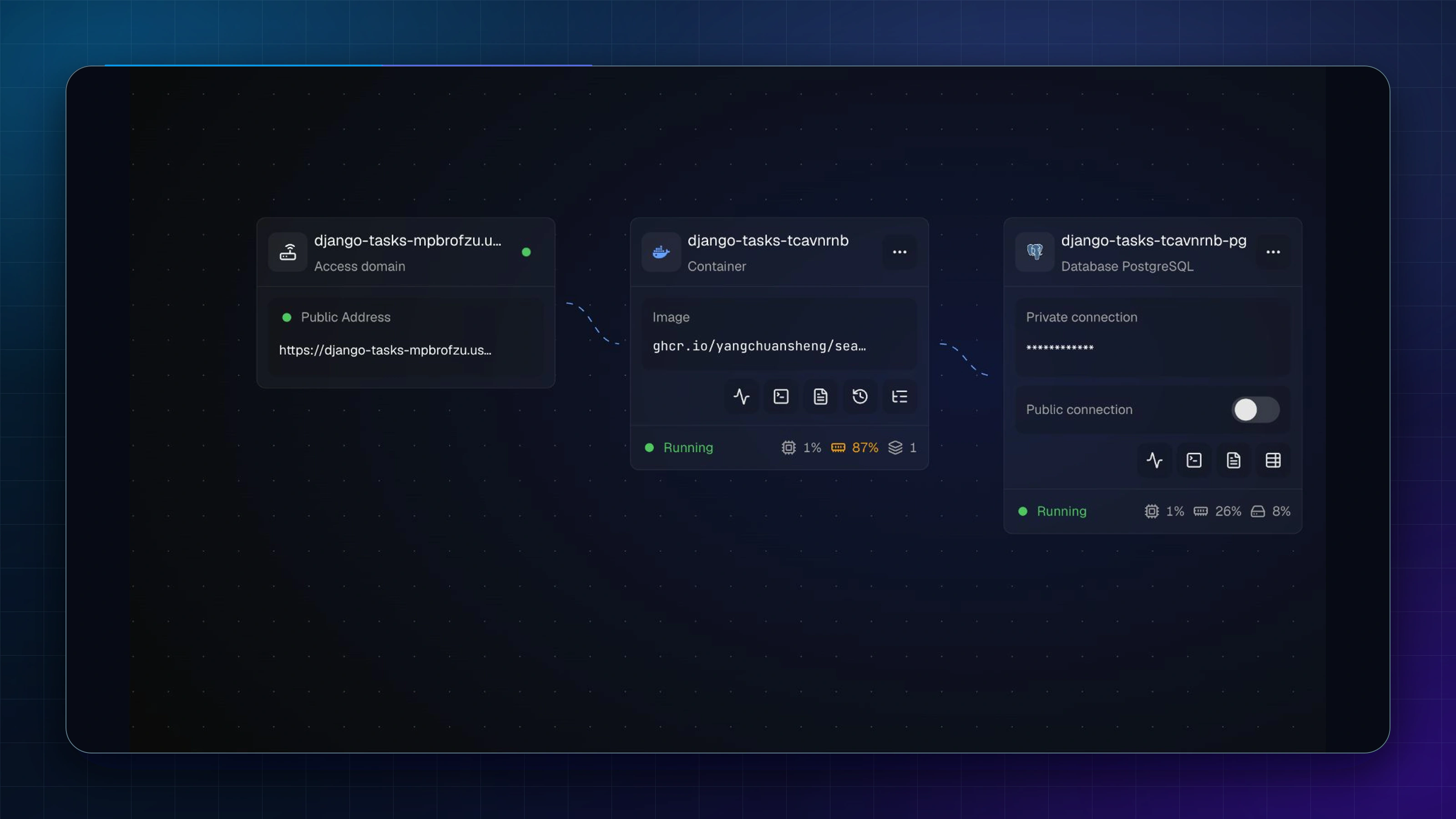
Sealos Project Canvas showing the healthy Django application, private PostgreSQL, and public accessSealos Project Canvas showing the healthy Django application, private PostgreSQL, and public access

If you see a migration connection or authentication error: Review the application variables and private PostgreSQL connection status in the Sealos web interface, correct DATABASE_URL through local Codex with Sealos Skills, and deploy the saved target again.

Open the page and its static asset

Open the HTTPS URL returned by Sealos. The page should show Django tasks and Task list.

Set the returned host locally, then request the CSS directly:

export PUBLIC_HOST=<actual-public-host>
curl --fail --silent "https://$PUBLIC_HOST/static/tasks/app.css" | grep -F 'font-family: system-ui, sans-serif;'

Expected:

  font-family: system-ui, sans-serif;

If you see DisallowedHost or a CSRF origin error: Set ALLOWED_HOSTS to the exact hostname and CSRF_TRUSTED_ORIGINS to its full https:// origin through local Codex with Sealos Skills, then deploy the saved target again.

Create and read a Task through Django

  1. Enter Runtime proof from Sealos in the Title field.
  2. Select Add task.
  3. Confirm the browser returns to / and Task list shows Runtime proof from Sealos.
  4. Refresh the page and confirm the same Task remains visible.
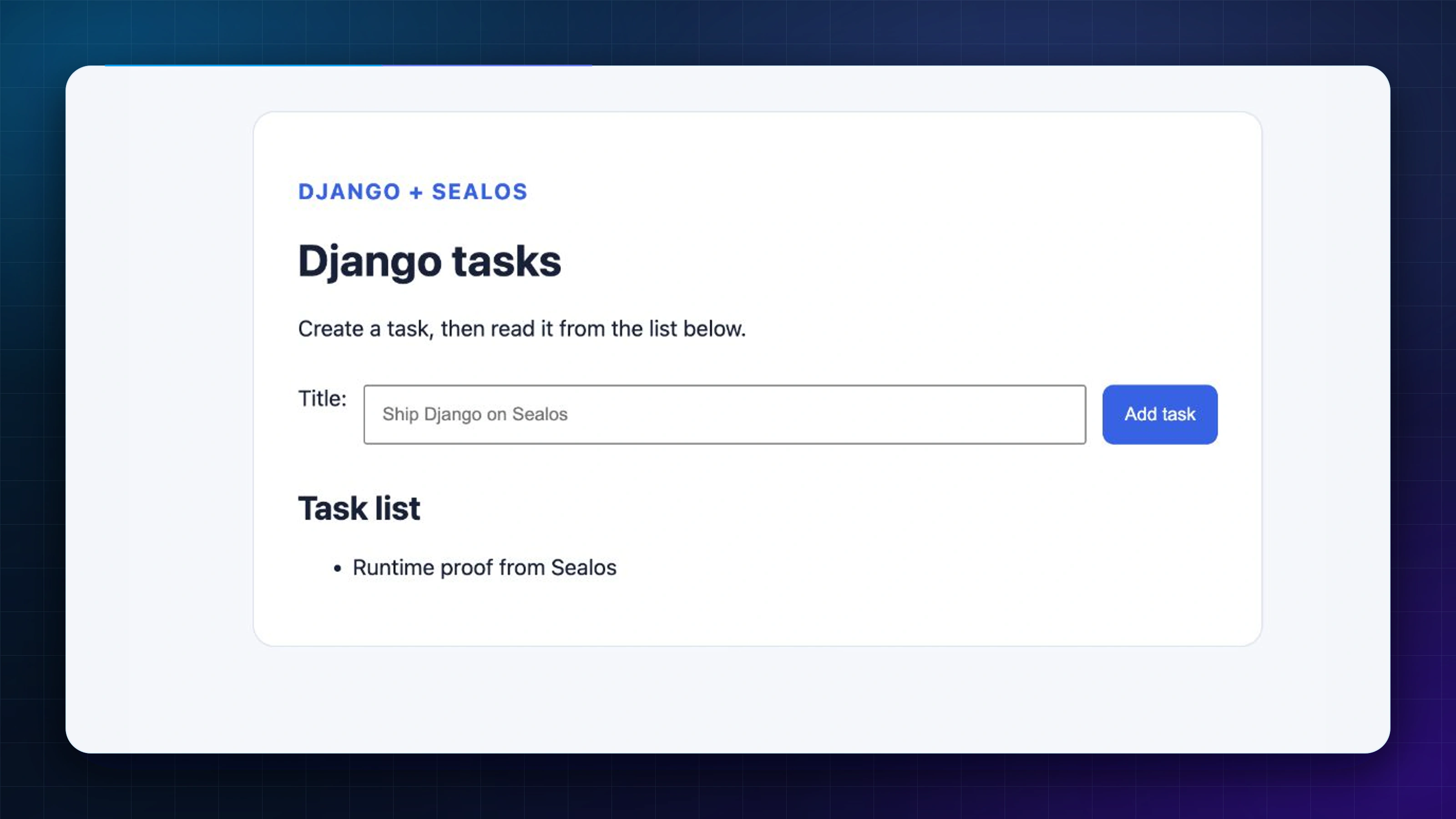
Live Django application on Sealos HTTPS showing the saved Runtime proof from Sealos taskLive Django application on Sealos HTTPS showing the saved Runtime proof from Sealos task

The POST exercises Django's CSRF-protected ModelForm; the redirected GET reads the saved row from private PostgreSQL.

Deploy your next change and continue

Change the visible heading in tasks/templates/tasks/task_list.html:

<h1>Django tasks on Sealos</h1>

From the repository root, ask Sealos Skills to update the saved application:

$sealos deploy this repo to Sealos Cloud.
Target: update the saved Django application from this repository; preserve its public URL, private PostgreSQL service, environment variables, and service bindings.
Runtime: use Python 3.12; keep uv 0.10 or newer available during build and runtime; install dependencies from uv.lock; keep the Django settings module as config.settings; probe GET `/`.
Lifecycle: Build=`uv sync --frozen --no-dev && DEBUG=False SECRET_KEY=build-only-collectstatic-key uv run --frozen --no-dev python manage.py collectstatic --noinput`; Pre-deploy=`uv run --frozen --no-dev python manage.py migrate --noinput`; Start=`uv run --frozen --no-dev gunicorn config.wsgi:application --bind 0.0.0.0:$PORT`; Port=`8080`; keep PORT=`8080`.
Service and environment: reuse the existing private PostgreSQL service, DATABASE_URL, protected SECRET_KEY, DEBUG=False, SECURE_SSL_REDIRECT=True, ALLOWED_HOSTS, and CSRF_TRUSTED_ORIGINS.
Verification: confirm build, migration, and start success; verify `Django tasks on Sealos` at the original URL; submit `Verify the update`; confirm both saved Tasks appear after the redirect.

Review the plan and confirm that it targets the saved application. After the update completes:

  1. Refresh the original URL and confirm Django tasks on Sealos appears.
  2. Submit a second Task named Verify the update.
  3. Confirm both Verify the update and Runtime proof from Sealos appear under Task list after the redirect and another refresh.
  4. Request /static/tasks/app.css again and confirm the CSS still loads.
Sealos LogoSealos

Unify Your Entire Workflow.

Code in a ready-to-use cloud environment, deploy with a click. Sealos combines the entire dev-to-prod lifecycle into one seamless platform. No more context switching.

Share to LinkedinShare to XShare to FacebookShare to RedditShare to Hacker News

Explore with AI

Get AI insights on this article

Share this article

Tip:AI will help you summarize key points and analyze technical details.