
sealos.io
AFFiNE
Build production-ready tools templates with Sealos.

https://affine.pro/deploy now
AFFiNE
Tools
A privacy-focused, local-first, open-source workspace for notes, docs, whiteboards, and team knowledge management.

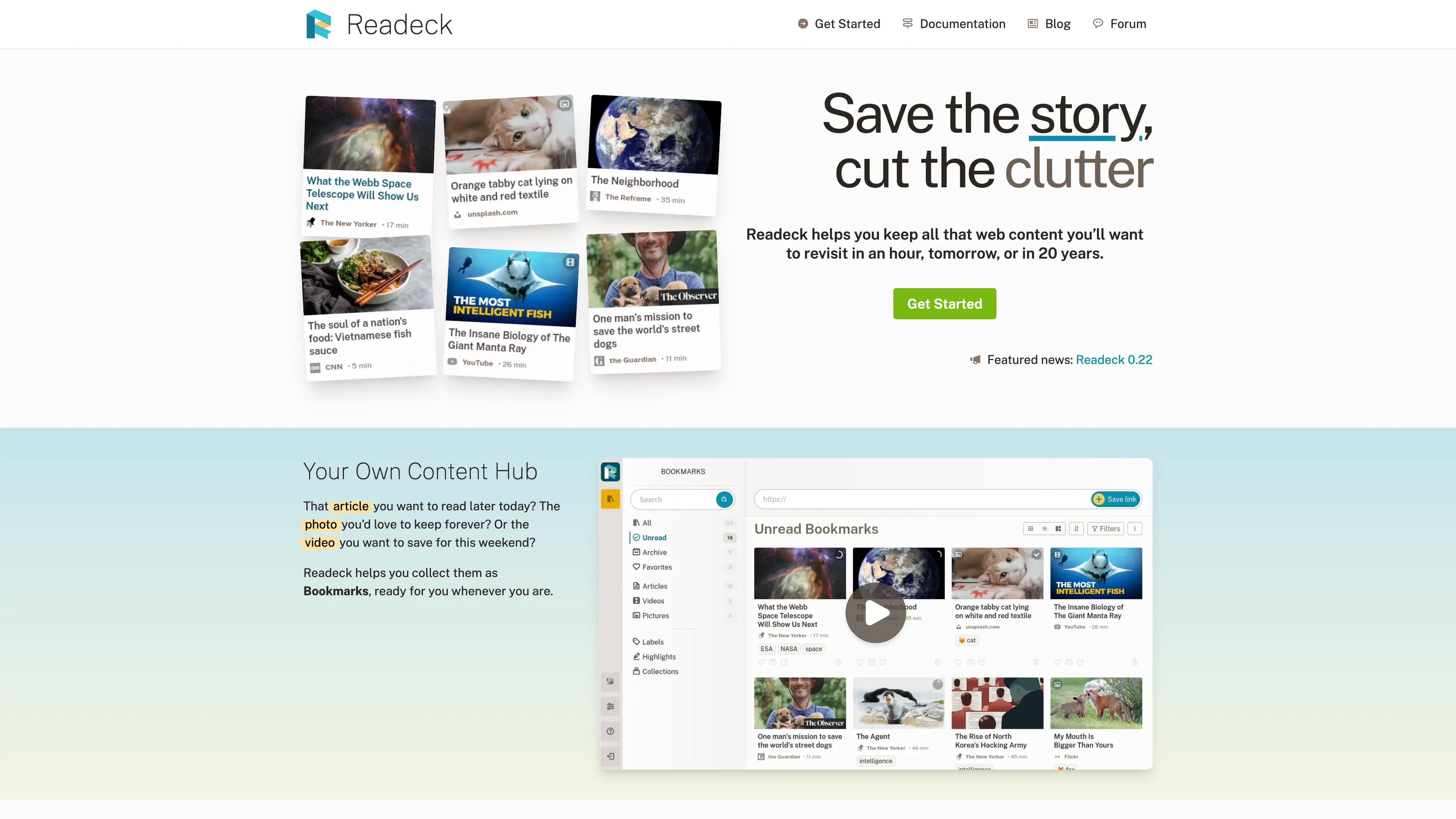
Readeck helps you keep all that web content you’ll want to revisit in an hour, tomorrow, or in 20 years.
Launch in your Sealos workspace.
Start with the resources defined by the Readeck template. Review CPU, memory, persistent storage, and network allocations for every service in Canvas. Capacity needs depend on your data and workload; monitor usage as they grow.
Template configuration and setupUse the application URL or connection details shown in Canvas. Follow the deployment guide for first-time account setup or client configuration, and keep generated credentials available for that step.
Sealos monthly plans include compute, memory, storage, and traffic. Size your plan for all deployed services. Software licenses and external AI or API services may have separate terms and charges. Confirm the applicable plan and optional charges in Cost Center.
Compare Sealos resource plansFor current cloud charges, refer to Sealos plan pricing. Upstream documentation may reference earlier billing models.

Readeck is a simple web application that lets you save the
precious readable content of web pages you like and want to keep
forever.
See it as a bookmark manager and a read later tool.

Like a page you're reading? Paste the link in Readeck and you're done!
Readeck saves the readable content of web pages for you to read later. It also detects when a page is an image or a video and adapts its process accordingly.
Move bookmarks to archives or favorites and add as many labels as you want.
Highlight the important content of your bookmarks to easily find it later.
If you need a dedicated section with all your bookmarks from the past 2 weeks labeled with "cat", Readeck lets you save this search query into a collection so you can access it later.
Want to keep something for later while browsing? No need to copy and paste a link. Install the browser extension and save bookmarks in one click!
What's best than reading your collected articles on your e-reader? You can export any article to an e-book file (EPUB). You can even export a collection to a single book!
On top of that, you can directly access Readeck's catalog and collections from your e-reader if it supports OPDS.
Whether you need to find a vague piece of text from an article, or all the articles with a specific label or from a specific website, we've got you covered!
Readeck is a modern take on so called boring, but proven, technology pieces. It guaranties very quick response times and a smooth user experience.
Will this article you like be online next year? In 10 year? Maybe not; maybe it's all gone, text and images. For this reason, and for your privacy, text and images are all stored in your Readeck instance the moment you save a link.
With the exception of videos, not a single request is made from your browser to an external website.
Done reading this promotional content? Good! Want to try Readeck on your laptop or a server? Even better!
To install or test Readeck with Docker or Podman, simply run the image:
docker run --rm -ti -p 8000:8000 -v readeck-data:/readeck codeberg.org/readeck/readeck:latest
You'll find all the container images there:
https://codeberg.org/readeck/-/packages/container/readeck/latest
Readeck is distributed as a single binary file. Using it is almost as easy as a container.
Create a new directory
mkdir -p readeck-install
cd readeck-install
Download the file matching your system from the last release
Make this file executable
Launch Readeck with the serve argument, for example:
./readeck-0.9.1-linux-amd64 serve
Once Readeck has started, it is accessible on:
http://localhost:8000/
More documentation is coming but if you already know how deploy containers or new services on a server (ie. with systemd), it should be quite straightforward.
Readeck usually can save the vast majority of news or blog articles but it sometimes fails to do so. The most common reasons are:
The most common solution to these problems is to install and use the Browser Extension. The extension sends the page's full content to Readeck, so anything can be saved. Moreover, it lets you select the exact content you want to save.
If a page really doesn't work at all, please open an issue.
Yes you can, for a limited time. On each article you can generate a link that'll be valid for 24 hours. You can generate a new link as many times as you want but it will always expire. You can also export or print an article to a PDF file.
There isn't, for several reasons:
Again, the Browser Extension will let you save any content you can access from your web browser.
Not yet but it might come at some point. Meanwhile, you can use Readeck on any mobile browser and even install as a mobile application.
If you'd like to save links using the "share" feature of your phone, you can use the following:
There are milestones, where you can see what's planned for the future releases.
For longer term goals, there are projects
There isn't but you can follow @[email protected] on Mastodon.
There isn't but you can join #readeck:matrix.org on Matrix.
If you think you found a security issue in Readeck, please DO NOT create an issue; they're public and it could potentially put all users at risk.
Send an email to [email protected] and you'll receive a follow-up as soon as possible.
Readeck was born out of frustration (and COVID lock-downs) from the tools that don't save everything related to the saved content, primarily images. This key principle guided every step of Readeck development.
Every bookmark is stored in a single, immutable, ZIP file. Parts of this file (HTML content, images, etc.) are directly served by the application or converted to a web page or an e-book when needed.
Readeck has a very simple database schema with a few tables (and a bit of clever JSON fields here and there). The recommended database engine is SQLite for most installations.
Unlike many modern web applications, Readeck is not a single page application built on top of an API with impossible to install dependencies and a mess of background processes.
Readeck is written in Go and all its content is rendered server side with some interactivity brought by Stimulus and Turbo.
This has proven to be a great combination when performance really matters.
Readeck is distributed under the terms of the GNU Affero General Public License v3.0. Here's a short summary of the license conditions:
A shorter path from an app you want to an app you can run. Sealos brings deployment and ongoing operations into one place.
Start with a ready-made template. Review its configuration and launch from the Sealos console.
Run on managed infrastructure with built-in workload scheduling and recovery.
Give your application a public HTTPS endpoint with certificates managed for you.
Keep application data on persistent volumes across container restarts.
Adjust CPU, memory, and replicas from the console as your workload changes.
Sealos provisions the resources defined by your template and brings them together in your workspace.
Container workloads with configurable CPU, memory, and replicas.
An address for your app, with managed TLS certificates.
A database provisioned alongside your app when the template calls for one.
Storage for the files and data your application needs to keep.
Application settings and secrets configured in one place.
Inspect container logs and resource usage from the console.
Resources and their configuration vary by template. Review the deployment form for this app’s exact setup.
Explore more production-ready templates.
Build production-ready tools templates with Sealos.
A privacy-focused, local-first, open-source workspace for notes, docs, whiteboards, and team knowledge management.
Build production-ready tools templates with Sealos.

Google Chrome browser running in a LinuxServer.io Selkies container with a web-based desktop UI.
Build production-ready tools templates with Sealos.
Deploy the self-hosted DeeplX translation API on Sealos and connect applications to its HTTP endpoint. This independent gateway integrates with DeepL translation.